ArrayArrayArrayArrayArrayArrayArrayArrayArrayArrayArrayArrayArrayArrayArrayArrayArrayArrayArrayArrayArrayArrayArrayArrayArray BrainModular BrainModular Users Forum 2013-08-16T20:38:38+02:00 https://www.brainmodular.com/forums/app.php/feed/topic/2650 2013-08-16T20:38:38+02:00 2013-08-16T20:38:38+02:00 https://www.brainmodular.com/forums/viewtopic.php?t=2650&p=27497#p27497 <![CDATA[Help with data generators...]]>
Let me know if you encounter any weirdness - I sometimes had issues with copy and paste, but didn't have the time yet to investigate.

I just googled the nautilus - wow, that's slightly over the top, I like it a bit more minimal ;-)
But very interesting that something like that exists!
I guess I would use similar ways of manufacture for my design.

Cheers,

Tom

Statistics: Posted by Thomas Helzle — 16 Aug 2013, 20:38


]]>
2013-08-16T18:07:41+02:00 2013-08-16T18:07:41+02:00 https://www.brainmodular.com/forums/viewtopic.php?t=2650&p=27496#p27496 <![CDATA[Help with data generators...]]>
and thank you for writing a detailed and updated doc for AoN_Random. time to get it back into workspaces!

(your speaker system reminds me a bit the b&w nautilus, with its long horn on the bass speaker)

Statistics: Posted by naarud — 16 Aug 2013, 18:07


]]>
2013-08-16T14:57:55+02:00 2013-08-16T14:57:55+02:00 https://www.brainmodular.com/forums/viewtopic.php?t=2650&p=27495#p27495 <![CDATA[Help with data generators...]]> If time permits, I'd really like to code some more for HH...

Cheers and thanks for all your hard work that makes it all possible!

Tom

Statistics: Posted by Thomas Helzle — 16 Aug 2013, 14:57


]]>
2013-08-16T14:43:17+02:00 2013-08-16T14:43:17+02:00 https://www.brainmodular.com/forums/viewtopic.php?t=2650&p=27494#p27494 <![CDATA[Help with data generators...]]> perfect job. they are very useful and interesting
Thanks

Statistics: Posted by senso — 16 Aug 2013, 14:43


]]>
2013-08-16T14:26:38+02:00 2013-08-16T14:26:38+02:00 https://www.brainmodular.com/forums/viewtopic.php?t=2650&p=27493#p27493 <![CDATA[Help with data generators...]]> http://www.design4audio.de where I mostly show design work for the audio realm.
There is also a page about the AoN_Random plugins with downloads and updated docs:
http://www.design4audio.de/home/aon-random/

Cheers,

Tom

Statistics: Posted by Thomas Helzle — 16 Aug 2013, 14:26


]]>
2013-07-29T17:54:18+02:00 2013-07-29T17:54:18+02:00 https://www.brainmodular.com/forums/viewtopic.php?t=2650&p=27371#p27371 <![CDATA[Help with data generators...]]>
I wasn't able to nail it down so far. It seems more likely to happen if I copy/paste multiple nodes at once (like one AoN node and a connected oscillator).

Internally I generate a random array, but that should be regenerated automatically based on the random seed.
It should be threadsafe for all I know (and since it worked when I restarted Usine with the same workspace, I guess it can't be that).

When it happened. it was as if the controls were no longer connected to anything. Output was a constant 1.0 for each number in the array (I was using the array version). Since I encountered hard-to-reproduce strangeness with copy/paste before, I thought I ask if I need to take care of something specific before I go bug hunting.

Since that isn't the case I'll do some more testing on my own - if I should find a reproducible way to make it happen, I'll let you know.

Thanks and Cheers,

Tom

Statistics: Posted by Thomas Helzle — 29 Jul 2013, 17:54


]]>
2013-07-29T17:34:22+02:00 2013-07-29T17:34:22+02:00 https://www.brainmodular.com/forums/viewtopic.php?t=2650&p=27369#p27369 <![CDATA[Help with data generators...]]>
basically, copy/paste is automatically handled for inlets

for the rest (some internal state or variable you want to preserve) it rely on getChunk and setChunk functions.
you can look in the matrix - display or set to see an example of how the cell tab are stored in getchunck and restored in setchunk
They somehow seem to get stuck in a weird state where using the controls doesn't really update what they do anymore
hard to visualize...
are you using some static or global variable for your random algo ? if so, more than one can produce conflicts.

i tried the AoN random, but didn't noticed something wrong when copying/pasting, is there some reproducible way to make it hang ?

Statistics: Posted by martignasse — 29 Jul 2013, 17:34


]]>
2013-07-28T13:46:29+02:00 2013-07-28T13:46:29+02:00 https://www.brainmodular.com/forums/viewtopic.php?t=2650&p=27357#p27357 <![CDATA[Help with data generators...]]> The above nodes for Usine HH make problems when they are copied and pasted. They somehow seem to get stuck in a weird state where using the controls doesn't really update what they do anymore. Restarting Usine solves it, but that isn't really a solution ;-)

So: is there something specific I have to do so that copy-paste works? Does it need specific code for that?
Or is this a problem in Usine HH? I sometimes have problems with copy-paste with other nodes too, but don't fully understand the pattern yet?

Thanks for any help,

Cheers,

Tom

Statistics: Posted by Thomas Helzle — 28 Jul 2013, 13:46


]]>
2013-07-19T20:00:01+02:00 2013-07-19T20:00:01+02:00 https://www.brainmodular.com/forums/viewtopic.php?t=2650&p=27253#p27253 <![CDATA[Help with data generators...]]>
http://www.screendream.de/AoN_Usine/AoN ... llyhock.7z

I'm unsure about the new stuff for Hollyhock, I hope I got it right.
So if anything seems to be missing or not-working or should be improved, please let me know.

Cheers,

Tom

Statistics: Posted by Thomas Helzle — 19 Jul 2013, 20:00


]]>
2013-05-31T22:30:44+02:00 2013-05-31T22:30:44+02:00 https://www.brainmodular.com/forums/viewtopic.php?t=2650&p=26618#p26618 <![CDATA[Help with data generators...]]>
Second plug (the array version) is working as well. This was much faster since I got the hang of it already.

The refresh of the array isn't working as well as it did in 5.x, but I'm sure I'll find out why... :-)

Overall I think the SDK got easier and clearer and the code is smaller and more readable.

Great work Martin!

Cheers,

Tom

Statistics: Posted by Thomas Helzle — 31 May 2013, 22:30


]]>
2013-05-24T23:53:23+02:00 2013-05-24T23:53:23+02:00 https://www.brainmodular.com/forums/viewtopic.php?t=2650&p=26471#p26471 <![CDATA[Help with data generators...]]>

I think the whole process was very easy actually, just some hours this afternoon.
The only hindrance was, that I did much more C than C++ in my life, so I basically run much more against boilerplate stuff than anything Usine specific...

I had one situation where threading with multiple AoN-Randoms seemed borked, but I have to re-try this with individually created nodes, since copy and paste of nodes introduces a lot of weirdness in the current release.

I'll report how it goes.

Cheers,

Tom

Statistics: Posted by Thomas Helzle — 24 May 2013, 23:53


]]>
2013-05-24T23:28:50+02:00 2013-05-24T23:28:50+02:00 https://www.brainmodular.com/forums/viewtopic.php?t=2650&p=26470#p26470 <![CDATA[Help with data generators...]]>

let me know about your feeling in the updating process

and i'll test your beta modules, for sure ;)

PS : you can continue the conversion with the 233 sdk, the 234 addition isn't needed for your case, you'll just have to recompile with it at the end

Statistics: Posted by martignasse — 24 May 2013, 23:28


]]>
2013-05-24T23:06:38+02:00 2013-05-24T23:06:38+02:00 https://www.brainmodular.com/forums/viewtopic.php?t=2650&p=26468#p26468 <![CDATA[Help with data generators...]]> The first is running already, the others will follow.
As soon as I'm confident that they work reliably, I'll provide a betaversion for you guys and gals to try :-)

Cheers,

Tom

Statistics: Posted by Thomas Helzle — 24 May 2013, 23:06


]]>
2011-08-07T01:00:03+02:00 2011-08-07T01:00:03+02:00 https://www.brainmodular.com/forums/viewtopic.php?t=2650&p=20453#p20453 <![CDATA[Help with data generators...]]>
one quesion: do I have to recompile my addons for 5.70?
It seems that the input fields behave faulty now with rc1. I can enter values like 10 or 1 or 5, but when I try to enter for instance 0.5 or 0,5, the value goes to something like 0.000001 - very small numbers. I'm unable to enter decimals (for instance for offset or scale in AoN_Random).
I can only work around it if I hook up sliders or knobs to the inputs, then it behaves like expected...

Is that a bug or a feature? ;-)

Thanks and cheers!

Statistics: Posted by Thomas Helzle — 07 Aug 2011, 01:00


]]>
2011-02-06T16:24:21+02:00 2011-02-06T16:24:21+02:00 https://www.brainmodular.com/forums/viewtopic.php?t=2650&p=17915#p17915 <![CDATA[Help with data generators...]]> I cleaned up the code some more.
The examples have some tiny changes too.

Just redownload if you want.

One question: ATM I use ctAsynchronous for the callback of the RandomSeed ( on MSG_CHANGE ) in AoN Random, since I want it to have as little influence on performance as possible and it's not meant to be used as a continuous controller anyway.
Now when I doubleclick on the value in Usine to change it, there is a warning: "Asynchron loop".
It comes up before I actually enter something and hit return.
Is it simply a bad idea to use ctAsynchronous in this case or do I have to do something specific to prevent this message?

Cheers,

Thomas

Statistics: Posted by Thomas Helzle — 06 Feb 2011, 15:24


]]>
2011-02-04T22:48:43+02:00 2011-02-04T22:48:43+02:00 https://www.brainmodular.com/forums/viewtopic.php?t=2650&p=17910#p17910 <![CDATA[Help with data generators...]]>
today I updated AoN Random.
I now included the Random Seed and Scale parameters that you already know from AoN Random Array.
Since this changed the number of parameters, you may have to reconnect the output to the correct connector in projects you did with the previous beta.
This will also change the results you get (slightly, because of the new way I generate random numbers), so if you have something important, keep the old version somewhere in reach.

I also reworked the examples, they should work correctly with the new versions and especially the AoN_Random_Array example is much more interesting now (I hope).

Find the new things and the files in the original Documentation-Topics above.

Both add-ons have been cleaned out and if nobody reports any bugs over the next weeks, or asks for major updates, we should be ready to call them stable.

Cheers and thanks for any feedback or examples how you use the tools.

Thomas

Statistics: Posted by Thomas Helzle — 04 Feb 2011, 21:48


]]>
2011-02-01T15:38:07+02:00 2011-02-01T15:38:07+02:00 https://www.brainmodular.com/forums/viewtopic.php?t=2650&p=17889#p17889 <![CDATA[Help with data generators...]]> Statistics: Posted by soundmind — 01 Feb 2011, 14:38


]]>
2011-02-01T13:28:32+02:00 2011-02-01T13:28:32+02:00 https://www.brainmodular.com/forums/viewtopic.php?t=2650&p=17886#p17886 <![CDATA[Help with data generators...]]> I'm looking forward to what you come up with!

Have fun in Thailand! And be sure to sample some beautiful Athmos! ;)

Cheers,

Thomas

Statistics: Posted by Thomas Helzle — 01 Feb 2011, 12:28


]]>
2011-02-01T01:47:17+02:00 2011-02-01T01:47:17+02:00 https://www.brainmodular.com/forums/viewtopic.php?t=2650&p=17883#p17883 <![CDATA[Help with data generators...]]> thomas!!
now i can build a tool i was dreaming a while ago using this and caco's filters!. great

..but living in holidays for one month tomorow, so won't patch for a while :(
but ill be under thailand sun. full moon parties and all the mango coktails :D but won't resist check the forum probably .
see ya usinerz'

Statistics: Posted by 23fx23 — 01 Feb 2011, 00:47


]]>
2011-01-31T22:36:03+02:00 2011-01-31T22:36:03+02:00 https://www.brainmodular.com/forums/viewtopic.php?t=2650&p=17881#p17881 <![CDATA[Help with data generators...]]>
Please try again :-)

Thomas

Statistics: Posted by Thomas Helzle — 31 Jan 2011, 21:36


]]>
2011-01-31T22:19:09+02:00 2011-01-31T22:19:09+02:00 https://www.brainmodular.com/forums/viewtopic.php?t=2650&p=17880#p17880 <![CDATA[Help with data generators...]]> but i thought your ancient module was also providingins to out when cliqing on little square of module, i think it's a default usine behaviour, maybe no need to compute inside.. lokks great!!!

Statistics: Posted by 23fx23 — 31 Jan 2011, 21:19


]]>
2011-01-31T21:51:48+02:00 2011-01-31T21:51:48+02:00 https://www.brainmodular.com/forums/viewtopic.php?t=2650&p=17879#p17879 <![CDATA[Help with data generators...]]>
Thanks for the "Array out"and all these changes. I'd like to test it but the link you indicate that asks for a password what to do?

Thanks in advance

Statistics: Posted by multiphone — 31 Jan 2011, 20:51


]]>
2011-01-31T21:14:38+02:00 2011-01-31T21:14:38+02:00 https://www.brainmodular.com/forums/viewtopic.php?t=2650&p=17877#p17877 <![CDATA[Help with data generators...]]> Updated 6.2.2011

>>>>> AoN Usine <<<<< (why does the forum convert the Link name to small letters?)

This contains both "AoN Random" and "AoN Random Array" for your testing pleasure as well as some examples :)

Documentation:

AoN Random Array is very similar to AoN Random, but its output is a static array of values, not a continuous stream of control data.

I will only talk about the new stuff here, please check out the docs for AoN Random above for the other controls.
Image

As you can see, all the inputs are outputs now as well so you can easily use whatever you feed in further down the node tree.
Not sure what the "best practice" is here, but since it should not cost CPU cycles, I'm inclined to make all inputs available as outputs as well.

Mode & Calculate Array:
The Mode dropdown allows you to select if you want automatic, instantaneous updates if you change a value or only want updates to occur if you click on the "Calculate Array" button (or trigger the input, for instance with a clock).
For learning the ways of the node, I recommend the Automatic Mode, since it is very cool to directly see what the values do. If you find the recalculations too CPU hungry, use the Update on Click Mode. The later can also be used to create specific snapshots at certain times. It shouldn't use any CPU at all until clicking the button.
The button has no real function when the Automatic mode is used.

Random Seed:
see AoN Random.

Scale:
Since you can't change the timing you feed into AoN Random Array, I included this control to allow you to scale the output to your needs over the span of the Array. Start with something like 0.1, smaller values will give you a "zoomed in" view on the noise where details are more stretched out while larger values "zoom out" and at one point will give you something that looks more like typical randomness, since you can no longer see the interpolation.

This is a noise with Scale 0.08:
Image

The same noise with Scale 0.35:
Image

And the same again with Scale 1.0:
Image

So a larger value here means, that you can "see more" of the noise = zoom out.

The following values are the same as with AoN Random, so the next new one is:

Array Size:
Well, I guess this is self explanatory: this is how many values you have in your array :)

An array with 16 entries:
Image

And an array with 128 entries:
Image

Float Out & Integer Out:
For your convenience, I have two outputs where both export the same noise sequence, one as Float Array and one as rounded Integer Array. The first is good for parameter control, the second is best for something like midi.

I think that should be it - please let me know if you have any questions or suggestions!

And again: This is Beta Software, so anything may change, don't rely on it yet for serious use without thorough testing!

Please report any bugs you encounter!

Cheers,

Thomas

Statistics: Posted by Thomas Helzle — 31 Jan 2011, 20:14


]]>
2011-01-31T13:29:08+02:00 2011-01-31T13:29:08+02:00 https://www.brainmodular.com/forums/viewtopic.php?t=2650&p=17873#p17873 <![CDATA[Help with data generators...]]>
Yeah, I guess we have to do a betatest and you guys tell me if the load is too much and causes problems.
On my 8 core 2008 MacPro with Windows 7 Pro 64 it's okay, but I'm not sure about live performance on a laptop.

ATM I changed the node to react in realtime to changes of parameters (which looks amazing, since you can see the array update while you drag sliders - very intuitive :) ) Maybe I should make that optional, so you can either have realtime updates or update only when you press the Calculate Array Button.
I guess that's the best solution anyway since it allows you to control precisely, when to update and take "snapshots".

The one thing that takes the most CPU is changing the random seed, the calculation of the array itself is pretty fast.

One more question regarding that:
Is it preferable performance wise to fill in a separate internal array and then copy that to the output or is it fine to use SetEvtArrayData in my noise-generating loop to write each value separately? Is there a lot of overhead?

I'll do those changes and test some more before I'll upload the new add-on.

Cheers!

Thomas

Statistics: Posted by Thomas Helzle — 31 Jan 2011, 12:29


]]>
2011-01-31T10:32:07+02:00 2011-01-31T10:32:07+02:00 https://www.brainmodular.com/forums/viewtopic.php?t=2650&p=17872#p17872 <![CDATA[Help with data generators...]]> Statistics: Posted by caco — 31 Jan 2011, 09:32


]]>
BrainModular BrainModular Users Forum 2013-08-16T20:38:38+02:00 https://www.brainmodular.com/forums/app.php/feed/topic/2650 2013-08-16T20:38:38+02:00 2013-08-16T20:38:38+02:00 https://www.brainmodular.com/forums/viewtopic.php?t=2650&p=27497#p27497 <![CDATA[Help with data generators...]]>
Let me know if you encounter any weirdness - I sometimes had issues with copy and paste, but didn't have the time yet to investigate.

I just googled the nautilus - wow, that's slightly over the top, I like it a bit more minimal ;-)
But very interesting that something like that exists!
I guess I would use similar ways of manufacture for my design.

Cheers,

Tom

Statistics: Posted by Thomas Helzle — 16 Aug 2013, 20:38


]]>
2013-08-16T18:07:41+02:00 2013-08-16T18:07:41+02:00 https://www.brainmodular.com/forums/viewtopic.php?t=2650&p=27496#p27496 <![CDATA[Help with data generators...]]>
and thank you for writing a detailed and updated doc for AoN_Random. time to get it back into workspaces!

(your speaker system reminds me a bit the b&w nautilus, with its long horn on the bass speaker)

Statistics: Posted by naarud — 16 Aug 2013, 18:07


]]>
2013-08-16T14:57:55+02:00 2013-08-16T14:57:55+02:00 https://www.brainmodular.com/forums/viewtopic.php?t=2650&p=27495#p27495 <![CDATA[Help with data generators...]]> If time permits, I'd really like to code some more for HH...

Cheers and thanks for all your hard work that makes it all possible!

Tom

Statistics: Posted by Thomas Helzle — 16 Aug 2013, 14:57


]]>
2013-08-16T14:43:17+02:00 2013-08-16T14:43:17+02:00 https://www.brainmodular.com/forums/viewtopic.php?t=2650&p=27494#p27494 <![CDATA[Help with data generators...]]> perfect job. they are very useful and interesting
Thanks

Statistics: Posted by senso — 16 Aug 2013, 14:43


]]>
2013-08-16T14:26:38+02:00 2013-08-16T14:26:38+02:00 https://www.brainmodular.com/forums/viewtopic.php?t=2650&p=27493#p27493 <![CDATA[Help with data generators...]]> http://www.design4audio.de where I mostly show design work for the audio realm.
There is also a page about the AoN_Random plugins with downloads and updated docs:
http://www.design4audio.de/home/aon-random/

Cheers,

Tom

Statistics: Posted by Thomas Helzle — 16 Aug 2013, 14:26


]]>
2013-07-29T17:54:18+02:00 2013-07-29T17:54:18+02:00 https://www.brainmodular.com/forums/viewtopic.php?t=2650&p=27371#p27371 <![CDATA[Help with data generators...]]>
I wasn't able to nail it down so far. It seems more likely to happen if I copy/paste multiple nodes at once (like one AoN node and a connected oscillator).

Internally I generate a random array, but that should be regenerated automatically based on the random seed.
It should be threadsafe for all I know (and since it worked when I restarted Usine with the same workspace, I guess it can't be that).

When it happened. it was as if the controls were no longer connected to anything. Output was a constant 1.0 for each number in the array (I was using the array version). Since I encountered hard-to-reproduce strangeness with copy/paste before, I thought I ask if I need to take care of something specific before I go bug hunting.

Since that isn't the case I'll do some more testing on my own - if I should find a reproducible way to make it happen, I'll let you know.

Thanks and Cheers,

Tom

Statistics: Posted by Thomas Helzle — 29 Jul 2013, 17:54


]]>
2013-07-29T17:34:22+02:00 2013-07-29T17:34:22+02:00 https://www.brainmodular.com/forums/viewtopic.php?t=2650&p=27369#p27369 <![CDATA[Help with data generators...]]>
basically, copy/paste is automatically handled for inlets

for the rest (some internal state or variable you want to preserve) it rely on getChunk and setChunk functions.
you can look in the matrix - display or set to see an example of how the cell tab are stored in getchunck and restored in setchunk
They somehow seem to get stuck in a weird state where using the controls doesn't really update what they do anymore
hard to visualize...
are you using some static or global variable for your random algo ? if so, more than one can produce conflicts.

i tried the AoN random, but didn't noticed something wrong when copying/pasting, is there some reproducible way to make it hang ?

Statistics: Posted by martignasse — 29 Jul 2013, 17:34


]]>
2013-07-28T13:46:29+02:00 2013-07-28T13:46:29+02:00 https://www.brainmodular.com/forums/viewtopic.php?t=2650&p=27357#p27357 <![CDATA[Help with data generators...]]> The above nodes for Usine HH make problems when they are copied and pasted. They somehow seem to get stuck in a weird state where using the controls doesn't really update what they do anymore. Restarting Usine solves it, but that isn't really a solution ;-)

So: is there something specific I have to do so that copy-paste works? Does it need specific code for that?
Or is this a problem in Usine HH? I sometimes have problems with copy-paste with other nodes too, but don't fully understand the pattern yet?

Thanks for any help,

Cheers,

Tom

Statistics: Posted by Thomas Helzle — 28 Jul 2013, 13:46


]]>
2013-07-19T20:00:01+02:00 2013-07-19T20:00:01+02:00 https://www.brainmodular.com/forums/viewtopic.php?t=2650&p=27253#p27253 <![CDATA[Help with data generators...]]>
http://www.screendream.de/AoN_Usine/AoN ... llyhock.7z

I'm unsure about the new stuff for Hollyhock, I hope I got it right.
So if anything seems to be missing or not-working or should be improved, please let me know.

Cheers,

Tom

Statistics: Posted by Thomas Helzle — 19 Jul 2013, 20:00


]]>
2013-05-31T22:30:44+02:00 2013-05-31T22:30:44+02:00 https://www.brainmodular.com/forums/viewtopic.php?t=2650&p=26618#p26618 <![CDATA[Help with data generators...]]>
Second plug (the array version) is working as well. This was much faster since I got the hang of it already.

The refresh of the array isn't working as well as it did in 5.x, but I'm sure I'll find out why... :-)

Overall I think the SDK got easier and clearer and the code is smaller and more readable.

Great work Martin!

Cheers,

Tom

Statistics: Posted by Thomas Helzle — 31 May 2013, 22:30


]]>
2013-05-24T23:53:23+02:00 2013-05-24T23:53:23+02:00 https://www.brainmodular.com/forums/viewtopic.php?t=2650&p=26471#p26471 <![CDATA[Help with data generators...]]>

I think the whole process was very easy actually, just some hours this afternoon.
The only hindrance was, that I did much more C than C++ in my life, so I basically run much more against boilerplate stuff than anything Usine specific...

I had one situation where threading with multiple AoN-Randoms seemed borked, but I have to re-try this with individually created nodes, since copy and paste of nodes introduces a lot of weirdness in the current release.

I'll report how it goes.

Cheers,

Tom

Statistics: Posted by Thomas Helzle — 24 May 2013, 23:53


]]>
2013-05-24T23:28:50+02:00 2013-05-24T23:28:50+02:00 https://www.brainmodular.com/forums/viewtopic.php?t=2650&p=26470#p26470 <![CDATA[Help with data generators...]]>

let me know about your feeling in the updating process

and i'll test your beta modules, for sure ;)

PS : you can continue the conversion with the 233 sdk, the 234 addition isn't needed for your case, you'll just have to recompile with it at the end

Statistics: Posted by martignasse — 24 May 2013, 23:28


]]>
2013-05-24T23:06:38+02:00 2013-05-24T23:06:38+02:00 https://www.brainmodular.com/forums/viewtopic.php?t=2650&p=26468#p26468 <![CDATA[Help with data generators...]]> The first is running already, the others will follow.
As soon as I'm confident that they work reliably, I'll provide a betaversion for you guys and gals to try :-)

Cheers,

Tom

Statistics: Posted by Thomas Helzle — 24 May 2013, 23:06


]]>
2011-08-07T01:00:03+02:00 2011-08-07T01:00:03+02:00 https://www.brainmodular.com/forums/viewtopic.php?t=2650&p=20453#p20453 <![CDATA[Help with data generators...]]>
one quesion: do I have to recompile my addons for 5.70?
It seems that the input fields behave faulty now with rc1. I can enter values like 10 or 1 or 5, but when I try to enter for instance 0.5 or 0,5, the value goes to something like 0.000001 - very small numbers. I'm unable to enter decimals (for instance for offset or scale in AoN_Random).
I can only work around it if I hook up sliders or knobs to the inputs, then it behaves like expected...

Is that a bug or a feature? ;-)

Thanks and cheers!

Statistics: Posted by Thomas Helzle — 07 Aug 2011, 01:00


]]>
2011-02-06T16:24:21+02:00 2011-02-06T16:24:21+02:00 https://www.brainmodular.com/forums/viewtopic.php?t=2650&p=17915#p17915 <![CDATA[Help with data generators...]]> I cleaned up the code some more.
The examples have some tiny changes too.

Just redownload if you want.

One question: ATM I use ctAsynchronous for the callback of the RandomSeed ( on MSG_CHANGE ) in AoN Random, since I want it to have as little influence on performance as possible and it's not meant to be used as a continuous controller anyway.
Now when I doubleclick on the value in Usine to change it, there is a warning: "Asynchron loop".
It comes up before I actually enter something and hit return.
Is it simply a bad idea to use ctAsynchronous in this case or do I have to do something specific to prevent this message?

Cheers,

Thomas

Statistics: Posted by Thomas Helzle — 06 Feb 2011, 15:24


]]>
2011-02-04T22:48:43+02:00 2011-02-04T22:48:43+02:00 https://www.brainmodular.com/forums/viewtopic.php?t=2650&p=17910#p17910 <![CDATA[Help with data generators...]]>
today I updated AoN Random.
I now included the Random Seed and Scale parameters that you already know from AoN Random Array.
Since this changed the number of parameters, you may have to reconnect the output to the correct connector in projects you did with the previous beta.
This will also change the results you get (slightly, because of the new way I generate random numbers), so if you have something important, keep the old version somewhere in reach.

I also reworked the examples, they should work correctly with the new versions and especially the AoN_Random_Array example is much more interesting now (I hope).

Find the new things and the files in the original Documentation-Topics above.

Both add-ons have been cleaned out and if nobody reports any bugs over the next weeks, or asks for major updates, we should be ready to call them stable.

Cheers and thanks for any feedback or examples how you use the tools.

Thomas

Statistics: Posted by Thomas Helzle — 04 Feb 2011, 21:48


]]>
2011-02-01T15:38:07+02:00 2011-02-01T15:38:07+02:00 https://www.brainmodular.com/forums/viewtopic.php?t=2650&p=17889#p17889 <![CDATA[Help with data generators...]]> Statistics: Posted by soundmind — 01 Feb 2011, 14:38


]]>
2011-02-01T13:28:32+02:00 2011-02-01T13:28:32+02:00 https://www.brainmodular.com/forums/viewtopic.php?t=2650&p=17886#p17886 <![CDATA[Help with data generators...]]> I'm looking forward to what you come up with!

Have fun in Thailand! And be sure to sample some beautiful Athmos! ;)

Cheers,

Thomas

Statistics: Posted by Thomas Helzle — 01 Feb 2011, 12:28


]]>
2011-02-01T01:47:17+02:00 2011-02-01T01:47:17+02:00 https://www.brainmodular.com/forums/viewtopic.php?t=2650&p=17883#p17883 <![CDATA[Help with data generators...]]> thomas!!
now i can build a tool i was dreaming a while ago using this and caco's filters!. great

..but living in holidays for one month tomorow, so won't patch for a while :(
but ill be under thailand sun. full moon parties and all the mango coktails :D but won't resist check the forum probably .
see ya usinerz'

Statistics: Posted by 23fx23 — 01 Feb 2011, 00:47


]]>
2011-01-31T22:36:03+02:00 2011-01-31T22:36:03+02:00 https://www.brainmodular.com/forums/viewtopic.php?t=2650&p=17881#p17881 <![CDATA[Help with data generators...]]>
Please try again :-)

Thomas

Statistics: Posted by Thomas Helzle — 31 Jan 2011, 21:36


]]>
2011-01-31T22:19:09+02:00 2011-01-31T22:19:09+02:00 https://www.brainmodular.com/forums/viewtopic.php?t=2650&p=17880#p17880 <![CDATA[Help with data generators...]]> but i thought your ancient module was also providingins to out when cliqing on little square of module, i think it's a default usine behaviour, maybe no need to compute inside.. lokks great!!!

Statistics: Posted by 23fx23 — 31 Jan 2011, 21:19


]]>
2011-01-31T21:51:48+02:00 2011-01-31T21:51:48+02:00 https://www.brainmodular.com/forums/viewtopic.php?t=2650&p=17879#p17879 <![CDATA[Help with data generators...]]>
Thanks for the "Array out"and all these changes. I'd like to test it but the link you indicate that asks for a password what to do?

Thanks in advance

Statistics: Posted by multiphone — 31 Jan 2011, 20:51


]]>
2011-01-31T21:14:38+02:00 2011-01-31T21:14:38+02:00 https://www.brainmodular.com/forums/viewtopic.php?t=2650&p=17877#p17877 <![CDATA[Help with data generators...]]> Updated 6.2.2011

>>>>> AoN Usine <<<<< (why does the forum convert the Link name to small letters?)

This contains both "AoN Random" and "AoN Random Array" for your testing pleasure as well as some examples :)

Documentation:

AoN Random Array is very similar to AoN Random, but its output is a static array of values, not a continuous stream of control data.

I will only talk about the new stuff here, please check out the docs for AoN Random above for the other controls.

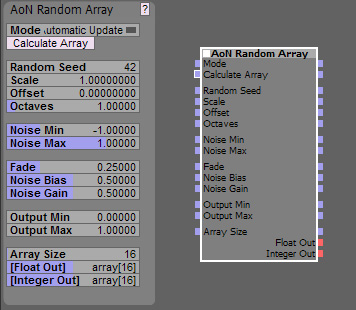
Image

As you can see, all the inputs are outputs now as well so you can easily use whatever you feed in further down the node tree.
Not sure what the "best practice" is here, but since it should not cost CPU cycles, I'm inclined to make all inputs available as outputs as well.

Mode & Calculate Array:
The Mode dropdown allows you to select if you want automatic, instantaneous updates if you change a value or only want updates to occur if you click on the "Calculate Array" button (or trigger the input, for instance with a clock).
For learning the ways of the node, I recommend the Automatic Mode, since it is very cool to directly see what the values do. If you find the recalculations too CPU hungry, use the Update on Click Mode. The later can also be used to create specific snapshots at certain times. It shouldn't use any CPU at all until clicking the button.
The button has no real function when the Automatic mode is used.

Random Seed:
see AoN Random.

Scale:
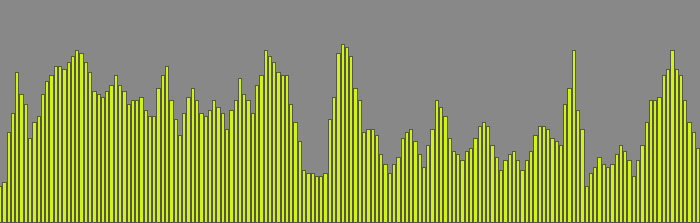
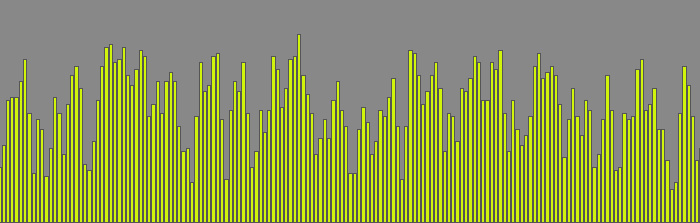
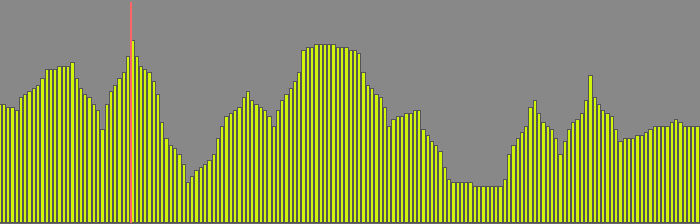
Since you can't change the timing you feed into AoN Random Array, I included this control to allow you to scale the output to your needs over the span of the Array. Start with something like 0.1, smaller values will give you a "zoomed in" view on the noise where details are more stretched out while larger values "zoom out" and at one point will give you something that looks more like typical randomness, since you can no longer see the interpolation.

This is a noise with Scale 0.08:
Image

The same noise with Scale 0.35:
Image

And the same again with Scale 1.0:
Image

So a larger value here means, that you can "see more" of the noise = zoom out.

The following values are the same as with AoN Random, so the next new one is:

Array Size:
Well, I guess this is self explanatory: this is how many values you have in your array :)

An array with 16 entries:
Image

And an array with 128 entries:
Image

Float Out & Integer Out:
For your convenience, I have two outputs where both export the same noise sequence, one as Float Array and one as rounded Integer Array. The first is good for parameter control, the second is best for something like midi.

I think that should be it - please let me know if you have any questions or suggestions!

And again: This is Beta Software, so anything may change, don't rely on it yet for serious use without thorough testing!

Please report any bugs you encounter!

Cheers,

Thomas

Statistics: Posted by Thomas Helzle — 31 Jan 2011, 20:14


]]>
2011-01-31T13:29:08+02:00 2011-01-31T13:29:08+02:00 https://www.brainmodular.com/forums/viewtopic.php?t=2650&p=17873#p17873 <![CDATA[Help with data generators...]]>
Yeah, I guess we have to do a betatest and you guys tell me if the load is too much and causes problems.
On my 8 core 2008 MacPro with Windows 7 Pro 64 it's okay, but I'm not sure about live performance on a laptop.

ATM I changed the node to react in realtime to changes of parameters (which looks amazing, since you can see the array update while you drag sliders - very intuitive :) ) Maybe I should make that optional, so you can either have realtime updates or update only when you press the Calculate Array Button.
I guess that's the best solution anyway since it allows you to control precisely, when to update and take "snapshots".

The one thing that takes the most CPU is changing the random seed, the calculation of the array itself is pretty fast.

One more question regarding that:
Is it preferable performance wise to fill in a separate internal array and then copy that to the output or is it fine to use SetEvtArrayData in my noise-generating loop to write each value separately? Is there a lot of overhead?

I'll do those changes and test some more before I'll upload the new add-on.

Cheers!

Thomas

Statistics: Posted by Thomas Helzle — 31 Jan 2011, 12:29


]]>
2011-01-31T10:32:07+02:00 2011-01-31T10:32:07+02:00 https://www.brainmodular.com/forums/viewtopic.php?t=2650&p=17872#p17872 <![CDATA[Help with data generators...]]> Statistics: Posted by caco — 31 Jan 2011, 09:32


]]>