
Welcome to %s forums

BrainModular Users Forum

Login Register

any ESI / directwire audio intefaces user?

General Discussion about whatever fits..
Post Reply
23fx23
Member
Posts: 2545
Contact:

Unread post by 23fx23 » 24 Oct 2016, 22:46

actually im performing with an allen & heath xone23c combo mixer/card, wich is nice but quite boring to travel with sometimes.

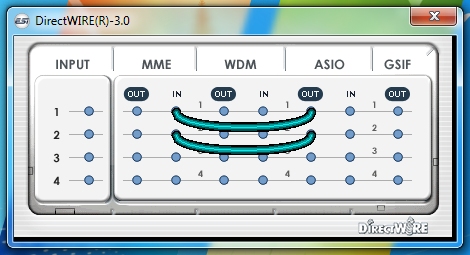
So I plan to buy a lighter/more compact card, and i came across ESI range wich seem to have develloped and included an 'internal' rewiring system called "directwire" in their driver.
Image

Im really interested in the potential possibility of rewiring usine & ableton this way, wondering if maybe that could allow a no extra buffer/processing strong link, will no need extra things to be installed.


so if by chance any usiner got esi soundcards would gladly hear opinions and feedback

_ever tested this system, would that 'rewire' system work , does it add latency?
_any feedback on achievable asio latency and converters quality / overall feel of esi?
_ what is lowest asio bloc size of driver?

damstraversaz
Member
Posts: 159
Location: Chambéry
Contact:

Unread post by damstraversaz » 25 Oct 2016, 11:09

first sorry for my poor english

I'm going to try too the esi in the next month, for small digital art installations.


about asio --> MME or WDM
it will be latency, depending of you system , generally less than 30 ms. It could be or not an issue , depending of your use of this.

For sending sound from asio ( usine) to visual software ( WDM input or asio input) there is some other solutions :

hardware : asio to wdm roland quad capture
you can use the "main quad capture" output . low latency ( less than 10ms). Rocks very solid, I'm using this since 3 years. But you can just deal with the main left and right audio signal from usine.

software

asio to wdm vst : wdm to vst
I'm using this for small installation , when latency is not a problem. Rocks solid too, I'm using it with two computers without issue. The big "+" : you can send just what tou want to the vst input, like a bus, changing gain etc. latency is near 30ms.

asio to asio: asiolinkpro
the "pro" solution. I'm using it on stage since two years. Very solid, I never had an issue. This is a bridge between your music applications. no latency , and all your audio software use the same driver.
By far the best solution in my opinion;
as you can have a unlimited numbers of input and output. The dev is really a great person : for exemple I ask him last year to add if possible a loop fonction ( sending asio out to the asio input of another application) , and he made a beta with this fonction in the week. You can use it with different outputs directly from usine. The loop fonction add one sample of latency , you can't hear it.

about sound card:
just be aware that Usine need an asio input for working.So all the sound cards from esi with just outputs will not work with usine ( I had this issue with a Native instrument 2dj card and olivier confirms it will not works)

hope it help a little

23fx23
Member
Posts: 2545
Contact:

Unread post by 23fx23 » 25 Oct 2016, 12:28

Hi damstraversaz,

Great insight , Thanks a lot for your infos and taking time! :)
I ll investigate all of them but yeah
asiolink pro seems the beast i have to test asap!!

23fx23
Member
Posts: 2545
Contact:

Unread post by 23fx23 » 25 Oct 2016, 18:31

so, i gave a shot at asiolinkpro and it's pretty amazing, indeed rock solid, no latency added and modular nth IO

go even beyond my expectations as could rewire flawlessly an usine 64 bits with live 32 bits that rocks.
now got LoopBe for midi exanges, and this for audio. midsync is rounded to integer but quite stable. intercommunication seems much more possible & workable for me now^^
really happy
thanks again :)

for the input issue ok nice to know cause i was about to try single output no input dac
http://www.esi-audio.com/products/drdacnano/

ill wait , maybe this is a future solvable issue...

gurulogic
Member
Posts: 1019
Contact:

Unread post by gurulogic » 25 Oct 2016, 20:39

Asiolinkpro looks very interesting, will have to take a closer look. With my RME MultifaceII I can do loopback between audio applications with my unused channels (10 channels free for such use by default if not using ADAT or SPDIF expansion, so 8 analogue i/o + 10 channel "rewire") The RME works great, very low (if any) latency for loopback, have yet to check exact amount. RME is expensive and and limited inter-application channels available depending on external i/o used. Asiolinkpro might be a great option to expand with, never heard of it before. Thanks for the tip! :)

Ariajazz
Member
Posts: 353
Contact:

Unread post by Ariajazz » 25 Oct 2016, 23:19

I own ESI MAYA 44 XTe. Nice soundcard, great sounding. Latency could be better but is not bad though. I have achieve better buffer size with asio4all than with the native driver. I haven't try the rewire feature but I'm interested in getting more outputs out of my system. I also have a BEHRINGER UCA 202. Any ideas on how to implement the rewire feature to get it? is it possible to use the onboard card?. I got 6 outputs with the ESI and the BEHRINGER using asio4all driver but it is not too solid, I had a couple of crashes so I'm affraid to use it in live situations.

damstraversaz
Member
Posts: 159
Location: Chambéry
Contact:

Unread post by damstraversaz » 26 Oct 2016, 08:40

Asiolinpro is a great app, It really helps , I'm glad you find it useful.

Ariajazz,I'm not sure about your idea. Maybe I'm wrong , but rewire is first made for "linking" several DAW ( in my opinion asiolink do this better , and is a lot more powerful) and not for using two asio driver for 2 differents audio interface in the same time. You will have latency issue, as the real latency will be different for each card, hardware issue , sound issue du to the gap of ms ( phasing etc.)
the solution seems to change your sound card with more outputs

Ariajazz
Member
Posts: 353
Contact:

Unread post by Ariajazz » 27 Oct 2016, 02:53

Well as I said before, I did add two more hardware outputs to USINE. 4 ESI MAYA + 2 BEHRINGER using asio4all, just one driver controlling both interfaces. I'm gonna take alook to Asiolink right now.... stay in tune.

User avatar
nay-seven
Site Admin
Posts: 5684
Location: rennes France
Contact:

Unread post by nay-seven » 07 Nov 2016, 09:04

I never test it, but for PC users there's also Voicemeeter banana ?

damstraversaz
Member
Posts: 159
Location: Chambéry
Contact:

Unread post by damstraversaz » 07 Nov 2016, 10:35

yes, but the sound card input are directly send to the output, that's could be an issue. The pro version allow you to use the asio insert driver inside usine, but you must change the routing inside voicemeeter, and it's not easy to do. About the ressource, voicemeeter take a lot more cpu than, asio pro at least for my computers, but is free and that's great

User avatar
nay-seven
Site Admin
Posts: 5684
Location: rennes France
Contact:

Unread post by nay-seven » 07 Nov 2016, 10:46

Ok, thanks for the infos and your feedback !

Post Reply

Who is online

Users browsing this forum: Google [Bot] and 38 guests