Hi everybody.
My old Retina Macbook Pro is at the end of its life. It's sad, because it's a very good machine that has never let me down. 11 years of loyal service, sometimes in harsh conditions (rain, wind, dust, heatwave etc...).
So I'm thinking of changing my computer. I know that Olivier and many other developers have problems with Apple. But I think I'm going to buy a new Macbook Pro anyway.
Is there any information about compatibility between Hollyhock and the latest Macbook Pro M2 or M3 ? What about the latest Apple OS?
Does anyone have any feedback to share?
Thank you very much.
Christophe.

Hollyhock Mac M2/M3 and last OS ?
-
cmodica

- Member
- Posts: 621
- Location: Pélissanne
- Contact:
-
cmodica
- Member
- Posts: 621
- Location: Pélissanne
- Contact:
Hello and thank you very much.
Christophe
Christophe
-
woodslanding
- Member
- Posts: 1327
Anyone else have any experience?
I'm thinking of trying to run my setup on a mac laptop... so far no laptop has been capable enough. I have a RYZEN 5900x desktop machine currently, and it is right at capacity running my wkp at 128/44.1. **Almost** never drops out.
Any sense which mac would be required to be comparable. I know it's a wild guess
edit: poking around the web, seems like only the MAX processors can equal the Ryzen in multi-core performance. Not sure whether single or multi-core benchmarks are more similar to how Usine works.... M2 and M3 both best Ryzen in single core... but they have fewer cores.
I know Macs have a reputation or running at a much higher % of CPU before dropping out, don't know if that's true for HH.
I'm thinking of trying to run my setup on a mac laptop... so far no laptop has been capable enough. I have a RYZEN 5900x desktop machine currently, and it is right at capacity running my wkp at 128/44.1. **Almost** never drops out.
Any sense which mac would be required to be comparable. I know it's a wild guess
edit: poking around the web, seems like only the MAX processors can equal the Ryzen in multi-core performance. Not sure whether single or multi-core benchmarks are more similar to how Usine works.... M2 and M3 both best Ryzen in single core... but they have fewer cores.
I know Macs have a reputation or running at a much higher % of CPU before dropping out, don't know if that's true for HH.
Custom Ryzen 5900x MATX build, Win10, Fireface UFX, touchscreen
Custom 2 manual midi keyboard
Usine, Kontakt, Reaktor, Synthmaster, Byome, Arturia, Soundtoys, Unify
Custom 2 manual midi keyboard
Usine, Kontakt, Reaktor, Synthmaster, Byome, Arturia, Soundtoys, Unify
-
senso

- Site Admin
- Posts: 4434
- Location: France
- Contact:
it's not only a matter of CPU.
In any cases the WIN intel version of HH is very optimized for the intel instruction set, unlike the Mac M's .
- there is troubles with some retina displays (see https://www.brainmodular.com/manuals/hh ... stallation)
- sound card drivers are important
Finally my opinion is that a Mac Mx can't replace a desktop machine. Personally I bought a small desktop PC (https://www.amazon.fr/dp/B0C7TVGKYQ?ref ... asin_title) and I'm very happy... damned fast...
In any cases the WIN intel version of HH is very optimized for the intel instruction set, unlike the Mac M's .
- there is troubles with some retina displays (see https://www.brainmodular.com/manuals/hh ... stallation)
- sound card drivers are important
Finally my opinion is that a Mac Mx can't replace a desktop machine. Personally I bought a small desktop PC (https://www.amazon.fr/dp/B0C7TVGKYQ?ref ... asin_title) and I'm very happy... damned fast...
Olivier Sens
www.brainmodular.com
www.brainmodular.com
-
SylvainT
- Site Admin
- Posts: 494
Hello,
I don’t know how your workspace looks like.
Just as a reminder, Usine is very efficient with multithreading. The CPU consumption you see in Usine correspond to the thread that is the most consumption, not the full consumption of the CPU. Refer to the OS CPU overview. If the total consumption is lower than the one you see in Usine, it means you still have power available.
Then, try to work on this in your workspace. Dispatch your work on more threads, desactivate things you don't need, use more racks. Use multithread capabilities when possible (on racks, on polyphonic sub-patches). Be careful with audio routings that don't like multitthreading except if you use audio buses. Find high CPU patch consumers, simplify....
The main issue is plug-ins, mainly VSTi, that are heavy. Usine doesn't deal with their multithreading implementation.
With 128 samples for buffer, and 128 samples for bloc size, Usine can handle very heavy workspaces, on a recent laptop.
But there is not that much a difference between core power. If you have a too heavy thread, it will remain too heavy whatever the engine you use.
Sylvain
I don’t know how your workspace looks like.
Just as a reminder, Usine is very efficient with multithreading. The CPU consumption you see in Usine correspond to the thread that is the most consumption, not the full consumption of the CPU. Refer to the OS CPU overview. If the total consumption is lower than the one you see in Usine, it means you still have power available.
Then, try to work on this in your workspace. Dispatch your work on more threads, desactivate things you don't need, use more racks. Use multithread capabilities when possible (on racks, on polyphonic sub-patches). Be careful with audio routings that don't like multitthreading except if you use audio buses. Find high CPU patch consumers, simplify....
The main issue is plug-ins, mainly VSTi, that are heavy. Usine doesn't deal with their multithreading implementation.
With 128 samples for buffer, and 128 samples for bloc size, Usine can handle very heavy workspaces, on a recent laptop.
But there is not that much a difference between core power. If you have a too heavy thread, it will remain too heavy whatever the engine you use.
Sylvain
-
woodslanding
- Member
- Posts: 1327
Thanks for all the info. I was just revisiting the mac idea. Senso's note about PC optimizations seems like a probable deal-breaker.
Sylvain, my wkp is mostly all about VST hosting, so yes, I am at the mercy of VST mfgs. So in that sense, it may not matter as much?
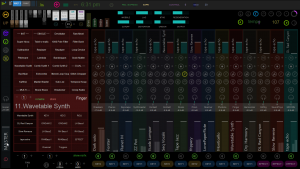
I also have started using UNIFY as a sub-host, and this is allowing me to cut down on my channels. Currently I run 16 tracks. 1 has all the global controls and processing, anything global that can afford an extra bloc of latency. The other 15 are vst hosting channels. I usually run 4 instances of Kontakt, 3 instances of Reaktor, 3 instances of Unify, 2 instances of Triad FX, 1 instance each of Keyscape, VB3-II, and Izotope Nektar. But by converting my reaktor and kontakt patches to Unify, I can cut down on the total channels. Probably down to 12 or so. Increases patch change time in many instances, but I can live with that.
Most of the Usine processing is involved with parameters, as I have a setup to allow my own learning and assignment of parameters to controls via the parameter arrays.
You can see a pic of my wkp in the Usine page at KVR: https://static.kvraudio.com/i/s/usine-hollyhock-4.png
cheers,
-eric
Sylvain, my wkp is mostly all about VST hosting, so yes, I am at the mercy of VST mfgs. So in that sense, it may not matter as much?
I also have started using UNIFY as a sub-host, and this is allowing me to cut down on my channels. Currently I run 16 tracks. 1 has all the global controls and processing, anything global that can afford an extra bloc of latency. The other 15 are vst hosting channels. I usually run 4 instances of Kontakt, 3 instances of Reaktor, 3 instances of Unify, 2 instances of Triad FX, 1 instance each of Keyscape, VB3-II, and Izotope Nektar. But by converting my reaktor and kontakt patches to Unify, I can cut down on the total channels. Probably down to 12 or so. Increases patch change time in many instances, but I can live with that.
Most of the Usine processing is involved with parameters, as I have a setup to allow my own learning and assignment of parameters to controls via the parameter arrays.
You can see a pic of my wkp in the Usine page at KVR: https://static.kvraudio.com/i/s/usine-hollyhock-4.png
cheers,
-eric
Custom Ryzen 5900x MATX build, Win10, Fireface UFX, touchscreen
Custom 2 manual midi keyboard
Usine, Kontakt, Reaktor, Synthmaster, Byome, Arturia, Soundtoys, Unify
Custom 2 manual midi keyboard
Usine, Kontakt, Reaktor, Synthmaster, Byome, Arturia, Soundtoys, Unify