
Welcome to %s forums

BrainModular Users Forum

Login Register

Missing midi device from devices view

General Discussion about whatever fits..
Post Reply
23fx23
Member
Posts: 2545
Contact:

Missing midi device from devices view

Post by 23fx23 » 01 Oct 2025, 20:12

Hey theree,
I play around a lot with arduino /esp32 as midi devices those days.
everything worked fine so far , but today for some reason there is one device i can't see in device view, so i can't drop it on racks.
i do see it in setup however. Ive tried rescan/recreate, delete all files in configg default device,
but i can't seem to manage to get it back,
any idea? (i do see it on other daws or midiview, so for debug it should be ok i think)
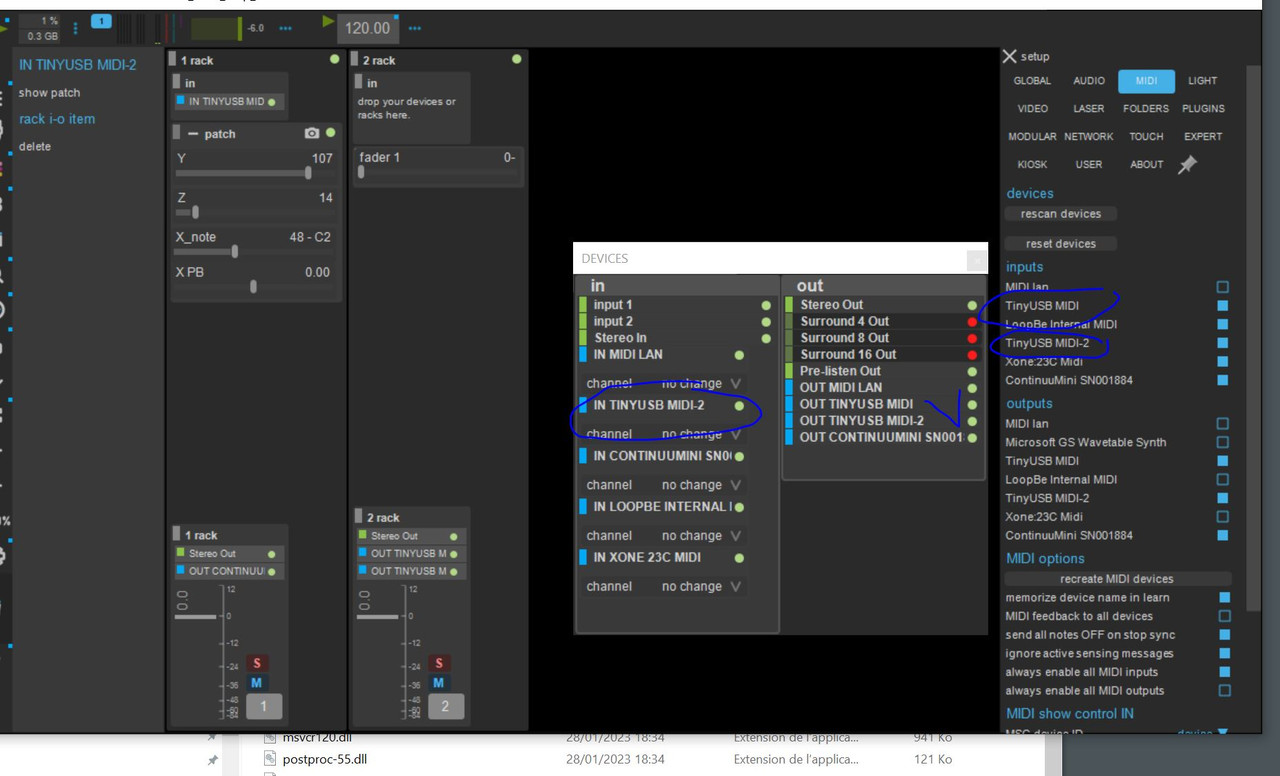
Image

23fx23
Member
Posts: 2545
Contact:

Post by 23fx23 » 01 Oct 2025, 20:21

ok nevermind, working back now
but in case it happens to someone else: i managed to get it back deleting all usine .ini files in config

User avatar
oli_lab
Member
Posts: 1261
Location: Brittany, France
Contact:

Post by oli_lab » 02 Oct 2025, 00:08

Hi,
I think that you can set the name of the USB midi differently from one arduino to the other so the USB enumerator won't get confused :
https://github.com/adafruit/Adafruit_Ti ... _ports.ino
In you case use only 1 port

hope this helps

++

Olivar
http://oli-lab.org

Win11 Ryzen9/32GB RAM - RME MADIFACE - SSL alpha link 4-16 - OSC capable interfaces

follow OLI_LAB adventures on Mastodon
@olivar_premier@mastodon.social

23fx23
Member
Posts: 2545
Contact:

Post by 23fx23 » 02 Oct 2025, 12:35

yes you're right, prob better even for me to not get confused lol.

another prob im facing (but it's windows related) is usine hangs on close sometimes, i finally understood it was because it's trying to delete files in my usine folder on desktop that for some reasons keep on reverting back to "read only" even tho i right clicked and unticked read only
i will dig on how to fix that those days, but if anyone knows, im taking!

23fx23
Member
Posts: 2545
Contact:

Post by 23fx23 » 02 Oct 2025, 12:36

yes you're right, prob better even for me to not get confused lol.

another prob im facing (but it's windows related) is usine hangs on close sometimes, i finally understood it was because it's trying to delete files in my usine folder on desktop that for some reasons keep on reverting back to "read only" even tho i right clicked and unticked read only
i will dig on how to fix that those days, but if anyone knows, im taking!

Post Reply

Who is online

Users browsing this forum: No registered users and 30 guests