
Welcome to %s forums

BrainModular Users Forum

Login Register

Some input on Node-usability and workflow...

Tell us what you'd like Usine to do
Post Reply
Thomas Helzle
Member
Posts: 334
Location: Berlin
Contact:

Unread post by Thomas Helzle » 12 May 2015, 13:29

Hey,

I currently work with several nodes systems in 3D and wanted to show you some things that I found totally awesome in Blender, Fabric-Engine Canvas, Grasshopper etc..

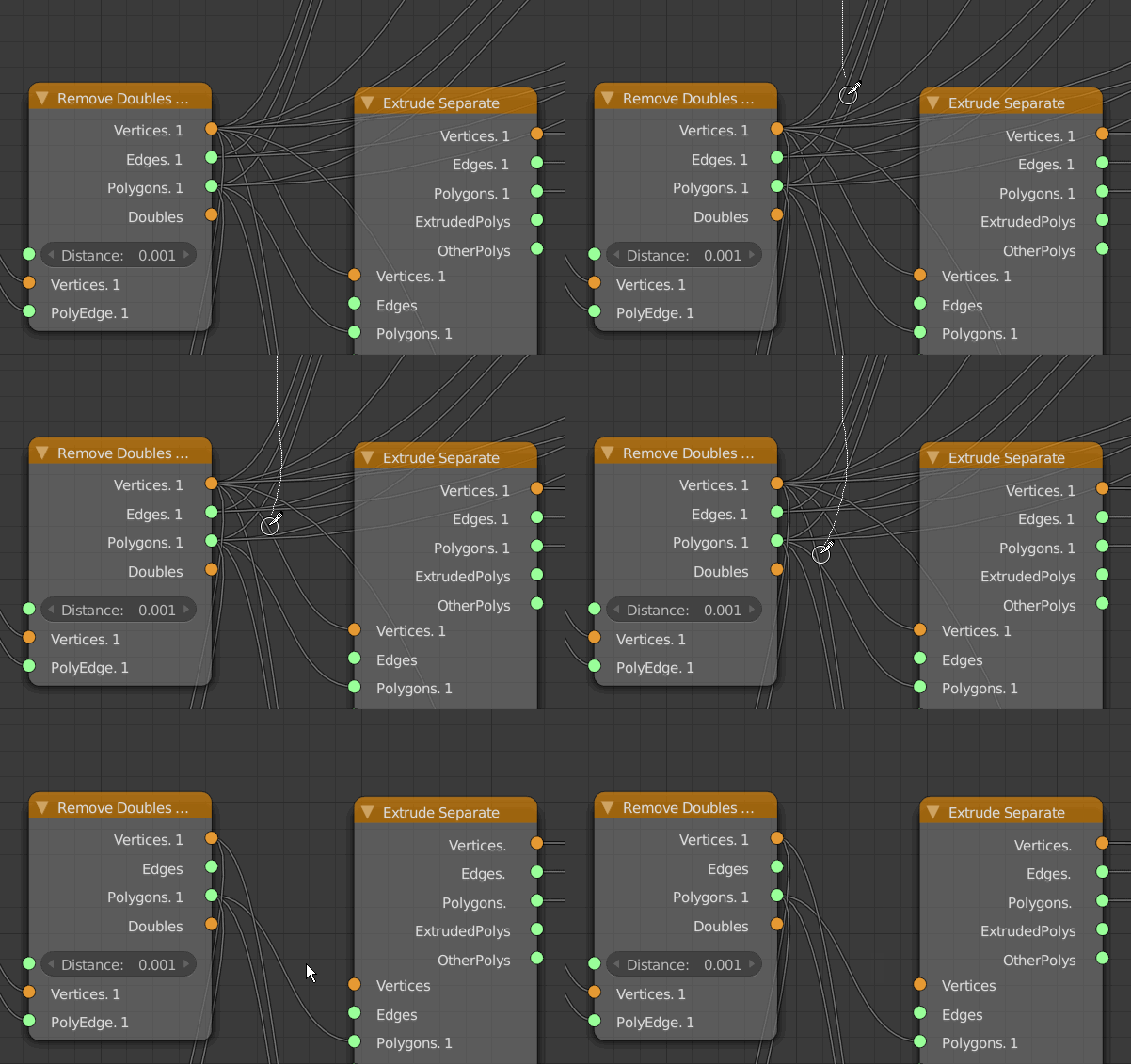
- If you CTRL-leftmouse-drag over the "wires" between nodes in Blender, you get a kind of "knife" that cuts all wires you drag over. That is unbelievable helpful and would be an awesome feature for Usine IMO.
Image


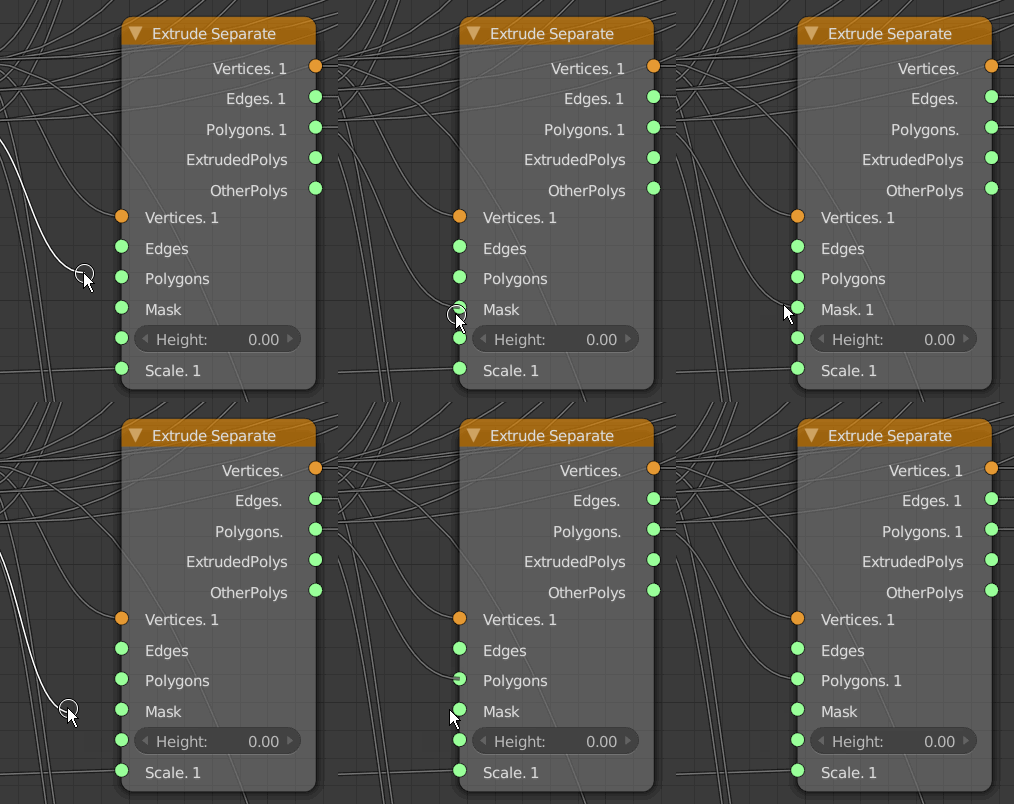
- One situation I run into extremely often is, that I want to move an existing wire to a different in- or output. In Blender and some other node systems you can click on the wire itself close to either end to be able to drag that end of the wire around. In Blender it only works for the "end" of the wire, but other system allow to move around both sides. Since Usine has a clear " wire center", it would be awesome to be able to click on the half you want to drag and then be able to reconnect it directly.
Image


- A very helpful shortcut action in Blender is "CTRL-D" to duplicate nodes (instead of CTRL-C/CTRL-V).
Speeds up one of the most used actions with nodes by 100% :-)


- Some node systems have the ability to "mute" a wire. This is extremely helpful for testing and debugging more complex patches where you sometimes have to disconnect a lot of wires to find out what a single one does, and it can be very complicated to re-connect them correctly afterwards.
In Usine I could imagine to SHIFT-select the wires and then either have a shortcut or a right-mouse menu with "mute wire" as an option.
The wire could then for instance show an "X" over it's central square.

- Speaking of which: Having a right mouse menu would be very welcome in Usine patching.
I know we had that discussion before and you said it's problematic for touch systems, but a long touch-and-hold could take care of that IMO.
I don't have a touch screen, I don't plan on getting one for my desktop and I really miss this each time I open Usine.

I'd like to see in a menu for Nodes:
- Disconnect all wires.
- Disconnect all inputs.
- Disconnect all outputs
- Show all connections (VSTs)
- Hide all unused connections (VSTs)
- Add basic setup (VSTs) (similar to what Usine does when you drag a VST into a new patch, but for patches with multiple VSTs)
- Copy node.
- Copy node settings.
- Paste node settings.
- Mute node.

On Wires (on their center square, also for multiple selections):
- Mute/Unmute.
- Paste-Insert (like drag over wire).

On the Background:
- Paste
- Insert favourite (with a user definable list of favourite nodes/patches for fast access)


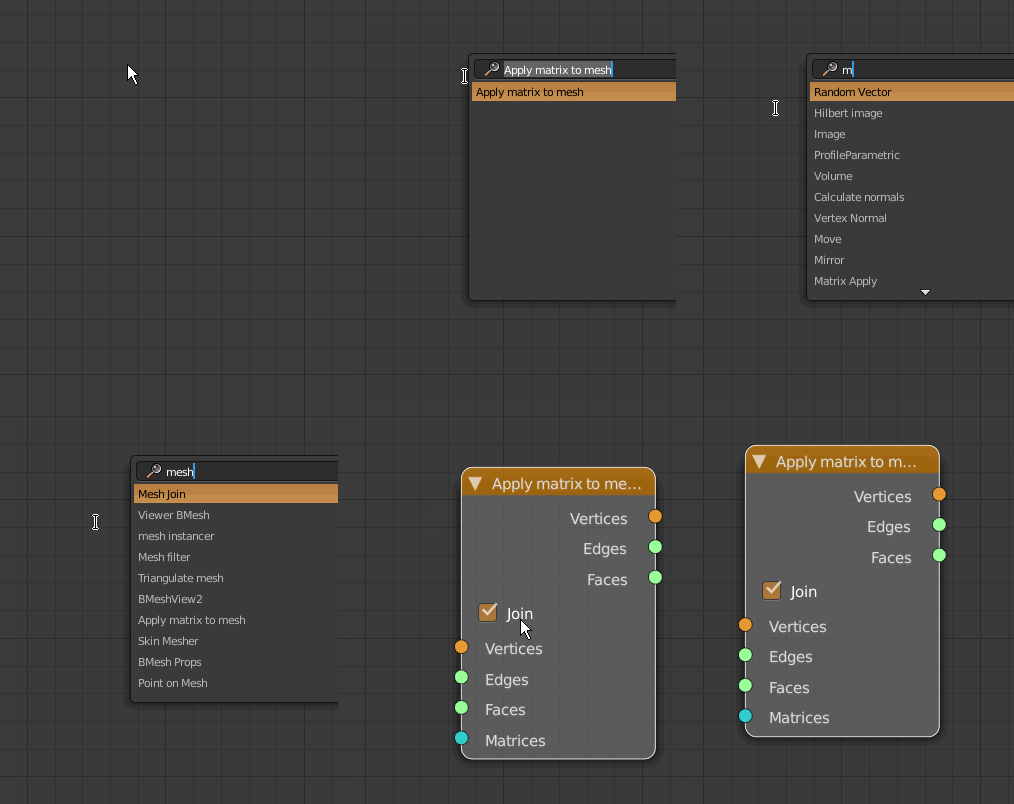
- What all those systems offer is a direct fuzzy search for nodes directly in the patch window. For instance Grasshopper: Doubleclick on the patch-background and you get a search-field where you can start typing part of the name and get a realtime-sorted-list of nodes. The search is fuzzy so you find all kinds of related nodes, even if you are not totally sure of their names.
There are also some shortcuts: type in "+" and you get an add node, "<" for a smaller than node, " for a comment node or more advanced, type in 5<10<25 to get a slider node that goes from 5 to 25 with a default value of 10. Totally awesome to use.
I find this so much faster in many cases than a browser, especially since you lose your open/close state of categories when you do a search in the browser which is so frustrating each time...
Here a screenshot from Blender where i's a bit different, but similar:
Image

You can also see that the right-click menu contains all the available nodes, which sometimes is also helpful.


Here some links to Blender Node tools for inspiration (not all of it translates to Usine, but there are some clever concepts there):
http://wiki.blender.org/index.php/Exten ... ency_Tools
http://wiki.blender.org/index.php/Exten ... e_Wrangler

Thank you very much!

Tom

User avatar
x.iso
Member
Posts: 565
Location: RU, Saint-Petersburg
Contact:

Unread post by x.iso » 17 Jun 2019, 18:12

Will some of this be available in HH4? One thing I want the most is addition of search bar to context menu whenever you drag a wire to empty space or right-click somewhere to insert a module. That would allow patching without relying on browser window, which would be a good relief in many ways.
join Hollyhock Usine Discord server: https://discord.gg/EdJarnE

User avatar
oli_lab
Member
Posts: 1261
Location: Brittany, France
Contact:

Unread post by oli_lab » 17 Jun 2019, 18:57

+1
http://oli-lab.org

Win11 Ryzen9/32GB RAM - RME MADIFACE - SSL alpha link 4-16 - OSC capable interfaces

follow OLI_LAB adventures on Mastodon
@olivar_premier@mastodon.social

User avatar
senso
Site Admin
Posts: 4424
Location: France
Contact:

Unread post by senso » 03 Jul 2019, 20:17

Thanks for the precise report, very interesting.

I Have noticed some easy suggestion to implement.

implemented
- reconnect a wire, is implemented in HH4 beta 044 with the shift key

should be implemented:
- duplicate modules Ctrl+D
- disconnect All module, disconnect all in, all out
- show/hide all connections (VST) is visible on the module settings in HH4


hard but we'll try to do that.
It's hard because a wire is not an object in Usine and has no property.
- mute/unmute wire
- knife to cut with CTRL

probably not implemented
because it's not compatible with the template engine, so very deep modifications
- the fuzzy search popup

senso+++

Thomas Helzle
Member
Posts: 334
Location: Berlin
Contact:

Unread post by Thomas Helzle » 03 Jul 2019, 20:38

Ha - resurrection of a very old thread.
Interesting to see that it's still relevant.
In the meantime I moved almost all my 3D work to SideFX Houdini - which is completely node based - and it also has a lot of convenient tools to manage connections, structure, nodes etc.

I no longer use Usine but I can highly recommend looking at those high-end graphic systems for ideas how to get nodes to work really well. No need to reinvent the wheel ;-)

This one is also cool and runs in the browser: https://cables.gl
Also interesting and directly related to music: https://www.loomer.co.uk/architect.htm


All the best,

Cheers,

Tom

User avatar
x.iso
Member
Posts: 565
Location: RU, Saint-Petersburg
Contact:

Unread post by x.iso » 04 Jul 2019, 22:10

senso wrote:probably not implemented
because it's not compatible with the template engine, so very deep modifications
- the fuzzy search popup

senso+++
The context menu that suggest modules is a template engine I suppose? Well, if it's hard to modify it, will it be easier to make alternative context menu that is a pop-up browser with search? if it's shown by holding modifier key instead of usual menu.
join Hollyhock Usine Discord server: https://discord.gg/EdJarnE

23fx23
Member
Posts: 2545
Contact:

Unread post by 23fx23 » 06 Jul 2019, 18:40

also houdini user here and was about to suggest most of same things.

what i pers use a lot in houdini is shortcut to cut wires or shake the 'module' to unwire it all.

what is also very nice is many math/logical modules can dynamically change their number inputs post creation.

for ex when wiring a A*B, if both A and B are wired, it will create a new C input and so on, so an a single module can make say 8 multiplications, or 8x logical AND ect..

prob more complex but useful when patching a lot and making it way more clear than chaining multiples modules with way less wires.

another very clever system is houdini expressions. nearly any param field anywhere can accept typed expressions, that can link to other object fields.
for ex a faderA value can have an expression like "/object/other_faderB/value + 2.0". for fader A reset value could point to itself max * 0.5, without wires/extra modules.
(this one prob way way more complex tho^^)

Post Reply

Who is online

Users browsing this forum: No registered users and 60 guests
