Hello,
In Preset module, "save to file & load from file" allow to save and restore one preset, but what about a list of presets?
In an old post Sylvain T wrote: "In HH5, you can save your presets list as a text file and reload it with or without confirmation"
but I don't know how to do that.
Thank you for your help.

Save Preset List
I was interested of doing this as well,
found a solution but kinda convoluted,
basically have a counter that increment, prep a new file name, load the preset, save to the file
increment counter, and so on, till reached end. couldn't test with 'heavy' presets yet tho.
would be nice to get some "export /load all files directly within preset module using its chunk data maybe..
maybe can still help by waiting..
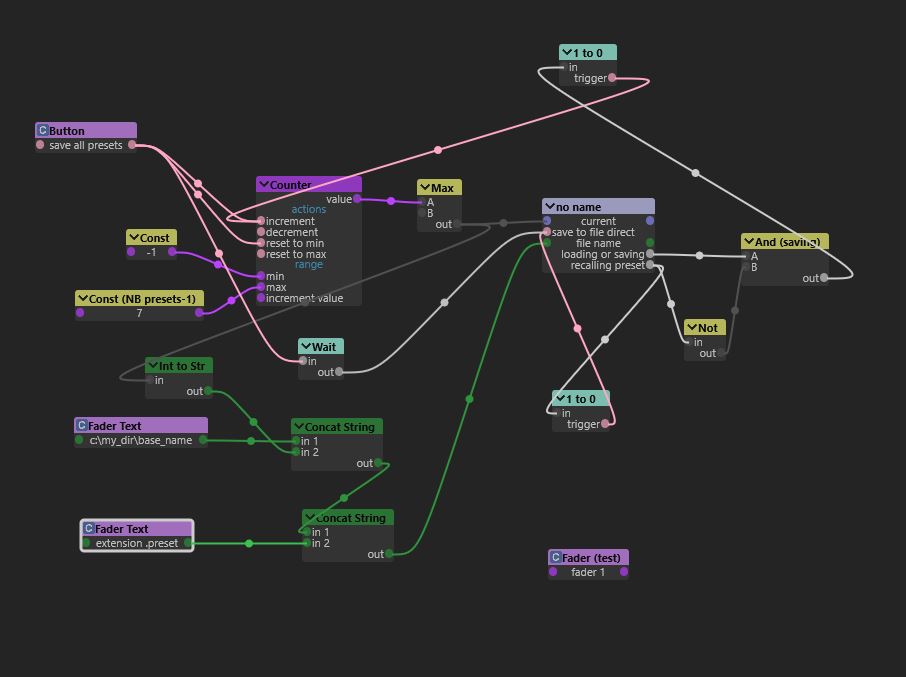
found a solution but kinda convoluted,
basically have a counter that increment, prep a new file name, load the preset, save to the file
increment counter, and so on, till reached end. couldn't test with 'heavy' presets yet tho.
would be nice to get some "export /load all files directly within preset module using its chunk data maybe..
maybe can still help by waiting..
-
Gilsornette
- Member
- Posts: 280
- Contact:
Hello,
Thank you for your reply.
That can be a solution for new presets, but a bit complicated for presets that have been created before (need to recall, rename them, etc...).
I was hoping there was an "implemented" solution:-)
Thank you for your reply.
That can be a solution for new presets, but a bit complicated for presets that have been created before (need to recall, rename them, etc...).
I was hoping there was an "implemented" solution:-)
this is still not as sexy as a build in export-load function would be,
but i came across this while investigating, in case some my be interested:
If man give a custom name to the preset module, then we can open the .wksp in a text editor and find its location in the file:
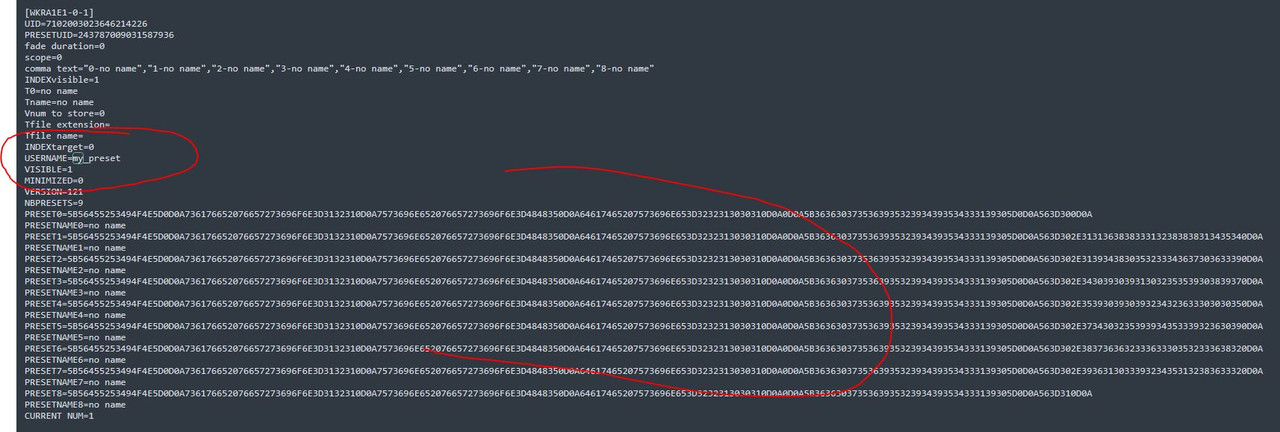
so could technically copy/paste those sections that contains all the presets names, and their binary chunk strings to different "all_presets" txt file
gonna try if can script something to automate an extract/replace,.. but man will still have to save/reload the wksp for that to be effective im affraid..
wonder if sdk could directly get/set modules chunks, that would allow a custom user module to do it..
or i think thats a descent feature request i would +1 :p
but i came across this while investigating, in case some my be interested:
If man give a custom name to the preset module, then we can open the .wksp in a text editor and find its location in the file:
so could technically copy/paste those sections that contains all the presets names, and their binary chunk strings to different "all_presets" txt file
gonna try if can script something to automate an extract/replace,.. but man will still have to save/reload the wksp for that to be effective im affraid..
wonder if sdk could directly get/set modules chunks, that would allow a custom user module to do it..
or i think thats a descent feature request i would +1 :p
actually found a much easier way
all we have to do is subpatch the preset module, then can easily save/reload to different subpatchs names
then it will export/reload all the presets one shot. :p
all we have to do is subpatch the preset module, then can easily save/reload to different subpatchs names
then it will export/reload all the presets one shot. :p
made this script for my own uses that helps automatically saving/reloading all the preset module subpatch
this has been a while i didn't deal with delphi script and iml,
so could prob be improved.. but working at least..
basically man just subpatch the preset module in a sub called "PGM", (the preset module should prob then target top parent patch)
connect to send IML as in pic
then on the script can chose a file to save to /reload from "whatev_preset_bank_name.pat",
finally just press 'load' or 'save' buttons accordingly
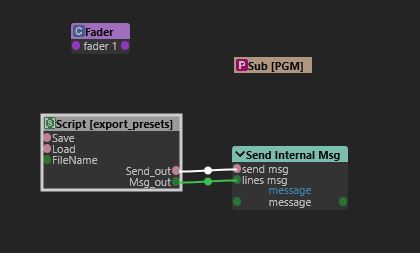
this has been a while i didn't deal with delphi script and iml,
so could prob be improved.. but working at least..
basically man just subpatch the preset module in a sub called "PGM", (the preset module should prob then target top parent patch)
connect to send IML as in pic
then on the script can chose a file to save to /reload from "whatev_preset_bank_name.pat",
finally just press 'load' or 'save' buttons accordingly
Code: Select all
var
  ButtonSave,
  ButtonLoad,
  FileName,
  Send_out,
  Msg_out : TParameter;

var file_path, file_name, msg : String;
var count : Integer;

PROCEDURE PROCESS();
BEGIN

IF(Send_out.asInteger = 1) THEN
 begin
 inc(count);
 IF(count>1) THEN BEGIN
 Send_out.asInteger(0);
 count := 0;
 end;
end;

END;

PROCEDURE INIT();
BEGIN
  ButtonSave := CreateParam('Save',ptButton,pioInput);
  ButtonLoad := CreateParam('Load',ptButton,pioInput);
  FileName := CreateParam('FileName',ptFileName,pioInput);
  Send_out := CreateParam('Send_out',ptTriggerLed,pioOutput);
  Msg_out := CreateParam('Msg_out',ptTextField,pioOutput);
END;

PROCEDURE SAVE_FILE;
BEGIN
file_path := FileName.AsString;
file_name := (ExtractFileName(file_path));
file_name := Copy(file_name,0,Pos('.',file_name)-1);

msg := 'SET_TARGET_PATCH PGM' + ','
 + 'SAVE_PATCH ' + '"' + file_path + '"' + ','
 + 'RENAME_PATCH PGM';
Msg_out.asString(msg);
Send_out.asInteger(1);

END;

PROCEDURE LOAD_FILE;
BEGIN
file_path := FileName.AsString;
file_name := (ExtractFileName(file_path));
file_name := Copy(file_name,0,Pos('.',file_name)-1);

msg := 'SET_TARGET_PATCH PGM' + ','
 + 'LOAD_PATCH ' + '"' + file_path + '"' + ','
 + 'RENAME_PATCH PGM';
Msg_out.asString(msg);
Send_out.asInteger(1);

END;

//CALLBACK
PROCEDURE CALLBACK(N:INTEGER);
BEGIN
  CASE N OF
   ButtonSave: Begin
   SAVE_FILE;
          End;
   ButtonLoad: Begin
   LOAD_FILE;
          End;
  FileName: Begin
  file_path := FileName.AsString;
          End;
  End;//END MAIN CASE
END;
-
Gilsornette
- Member
- Posts: 280
- Contact:
Hello,
Thank you very much for your help!
I've got troubles when using the script; here's the error message I got when trying to save a "bank" of presets
process msg SET_TARGET_PATCH PGM
Var not found PGM
SET_VAR patch 4268517304566742452=PGM
process msg SAVE_PATCH bank 1
process msg RENAME_PATCH PGM
process msg END_TEMPLATE
[68] Error :
PROC:uFileCopy1
ERROR:Path is empty
I attach the patch if you want to have a look
I also have a question: this script is very useful for new lists of presets but for those I created before having your script
the only way to save them is to copy the presets one by one to the PGM preset module, is that right? Or is there a faster way
I didn't think about?
Thank you very much for your help!
I've got troubles when using the script; here's the error message I got when trying to save a "bank" of presets
process msg SET_TARGET_PATCH PGM
Var not found PGM
SET_VAR patch 4268517304566742452=PGM
process msg SAVE_PATCH bank 1
process msg RENAME_PATCH PGM
process msg END_TEMPLATE
[68] Error :
PROC:uFileCopy1
ERROR:Path is empty
I attach the patch if you want to have a look
I also have a question: this script is very useful for new lists of presets but for those I created before having your script
the only way to save them is to copy the presets one by one to the PGM preset module, is that right? Or is there a faster way
I didn't think about?
- Attachments
-
- Preset List.pat
- (49.11 KiB) Downloaded 361 times
Who is online
Users browsing this forum: No registered users and 11 guests