Welcome to %s forums

BrainModular Users Forum

Login Register

Help with data generators...

Create your own modules in C++
Post Reply
Thomas Helzle
Member
Posts: 334
Location: Berlin
Contact:

Unread post by Thomas Helzle » 01 Jan 2011, 19:49

Hi,

I am very new to Usine, but would like to transfer some of my procedural shader work I do for 3D graphics to Usine using the SDK.
What I want to create is Midi and Data streams of different Fractal Noise algorithms (so not random but with an internal structure and "repeatable").
I looked at the code examples in the SDK, but they aren't about what I need, on the wiki I found none either.

Since I have the algorithms at hand already, what I would be looking for is a code example for something like the "random" generator in Usine that has outputs for data and midi.

Does somebody have a code example like this or would it be possible to get the code for the random node in c++?

Usually for me that's the fastest way to get into a SDK - see a working example of what I want to do and build on that ;-)

Thanks a lot!!!

Thomas

www.screendream.de

23fx23
Member
Posts: 2545
Contact:

Unread post by 23fx23 » 01 Jan 2011, 21:07

hey cool thomas, i once asked exactly the same in a thread:
http://sensomusic.com/forums/viewtopic.php?id=1522

i can't help you with c++ or sdk, but some masterz can certainly help ya..
looking towards your works.

Thomas Helzle
Member
Posts: 334
Location: Berlin
Contact:

Unread post by Thomas Helzle » 02 Jan 2011, 03:33

yeah, that's exactly what I'm talking about!
I have all the algorithms already from my 3D-shaders, but would need a "generator template" to get a headstart (and the SDK needs more practical examples anyway... ;-) ).
A simple sine generator or something like that would do.

The results are way more interesting IMO than pure randomness - I already have a prototype running in processing.
Having it as a node in Usine would be even more versatile.

Not sure if it would be fast enough to create audio oscillators too, but that could be interesting as well.

Cheers!

Thomas

martignasse
Site Admin
Posts: 611
Location: Lyon, FRANCE
Contact:

Unread post by martignasse » 03 Jan 2011, 12:49

Hi thomas,

Welcome to Usine, i which you an happy new year with the SDK :)

wow, your 3d shaders are high quality, we'll be honoured to see them in Usine !

You are completely right about the lake of example for the SDK :| this is growing slowly ;)

now about your questions :

1°)random data output
The 'TestControls' module should light you a little, precisely this line in the 'Process' function

Code: Select all

	// dataField value is set to a random number
	pPrototype->SetEvtData( pPrototype->m_dtfDataFieldExample, 100.0f * (rand() / (float)RAND_MAX) );
It's simple like that to populate an output data. Here, the random number is hard coded but you can replace this value by the result of your algo.
And other example (RollArray, HSLColor...) will show you how to deal with input (essentially in the 'CallBack' function) to manipulate your algo variables.


2° MIDI output)
Unfortunately, no SDK example yet,
But maybe you can lurk in script examples and forums threads, as the code structure is very similar (but DELPHI like syntax).
(I made a basic array to midi script in the 'matrix pack', 'matrix_fall_seq_example' but forums have plenty of thread about midi script)

And you'll surely need a time based data refresh at some point, for that, you'll have to count based on the m_masterInfo->pTimeInfo structure who reflect Usine time.

Sorry to not be more precise but hope it help

and if you have other questions, just go go go :)
Martin FLEURENT - Usine Developer - SDK maintainer

Thomas Helzle
Member
Posts: 334
Location: Berlin
Contact:

Unread post by Thomas Helzle » 03 Jan 2011, 16:01

Hi Martin!

A happy new year to you as well and thanks a lot for the feedback.

I will see if I can stick together something from the hints you gave me and start with a simple data output.
Good to know that the scripting language is similar to the SDK - should be helpful to look into some of those as well to see the overall workings.

And yes, timing is critical, since I would use it as the basis for all my calculations to make the pseudo-random patterns repeatable in a song (when used inside a host). I'll look into m_masterInfo->pTimeInfo and I'm sure I will have more questions for you soon ;-)

One more thing: When compiling the SDK examples, there is an error thrown for the postbuild where you xcopy the *.usr files to your Usine folder. This had me irritated for a while since the VC output asked if that fixed path is supposed to be a path or a file...
Not sure if it would be possible to either remove this when releasing the SDK or make it more obvious that this has to be changed by the user.

And as a last one for the moment: Interesting to know that Usine is written in Delphi - I thought that language is long dead ;-)
Does that also mean that there will be no 64 Bit version of Usine anytime soon or is Delphi still being developed and updated?
(never used Delphi myself - I started with VB 15 years ago and since most renderers are still written in C that's my main language nowadays)

Thanks again and best regards!

Thomas

Thomas Helzle
Member
Posts: 334
Location: Berlin
Contact:

Unread post by Thomas Helzle » 04 Jan 2011, 00:39

Image

Yay! It actually works :-)
(this is the generated output of a slow fractal noise with 16 octaves visualized by an oscilloscope)

But the one thing I didn't understand was how to use the m_masterInfo->pTimeInfo.
I currently feed time in from an external time(ms) node.
Would you have some hints on that Martin?

But on the other hand: What are others thoughts about this. I'm very new to usine, so I wonder what more experienced people here think:
Is it best to go full modular and leave it to the user what he wants to plug into the "time" slot (doesn't have to be time either) which drives the algorithm.
Or would it be preferred to have several settings inside the module?
And don't say "Both" ;-)

I will definitely implement some more controls to shape the noise (the screenshot is using a very slow noise with 16 octaves which create the roughness - at 1 octave, it would be a very smooth flowing curve. The number of octaves can be smoothly animated as well).

I call it a day now and will look into it some more tomorrow.

Cheers,

Thomas

User avatar
nay-seven
Site Admin
Posts: 5684
Location: rennes France
Contact:

Unread post by nay-seven » 04 Jan 2011, 07:14

Whaoo ! promising !

and yes, i suppose we'll need time control..?

23fx23
Member
Posts: 2545
Contact:

Unread post by 23fx23 » 04 Jan 2011, 07:21

edit: cross post with nay ;)

woa awesome !. about your question of time input, personally i think it's quite modular so we can feed what we want...?
but not sure i fully understand, maybe a time control in the module is simpler for user, don't know...
can't wait to test that, seems really cool. could it generate static arrays too? mm anyway we can queue data in array, nevermind
cool
great job thomas!!!

Thomas Helzle
Member
Posts: 334
Location: Berlin
Contact:

Unread post by Thomas Helzle » 04 Jan 2011, 22:40

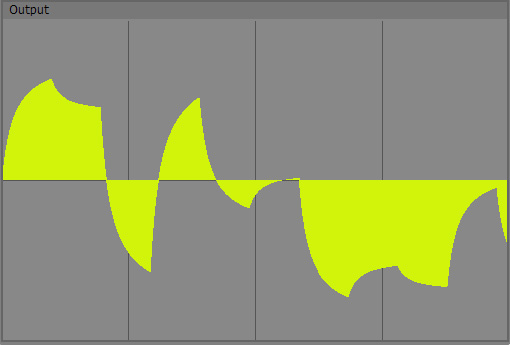
So now I have some more controls implemented:

Image
This is a one-octave special-noise, the result of a new idea I dreamed up tonight ;-)
At least it looks cool...

The shape can be controlled by several parameters.

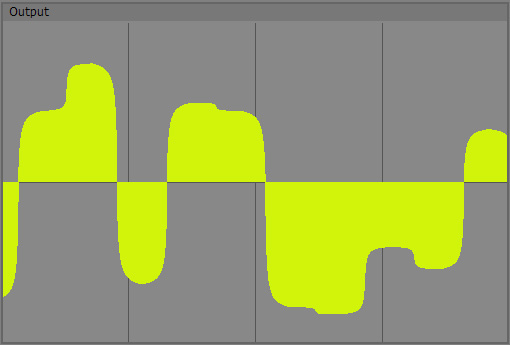
Image
This is the same noise with the same settings but with 2 octaves = more detail.


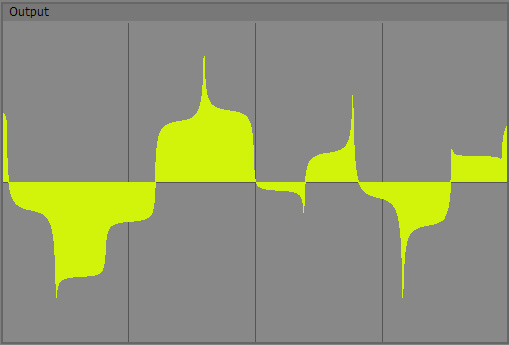
Image
And another one, one octave with different settings for the noise.


Now I think I have the basics working and can go on to some of the deeper and the convenience functions.

Still could need a hint on the time functions... :-)

... and I want to hear this as Audio - how do I create an oscillator? :-)

Cheers,

Thomas

caco
Member
Posts: 306
Contact:

Unread post by caco » 05 Jan 2011, 09:30

Looks interesting Thomas, some of the shapes are similar to what you see when doing FM synthesis between non-sine operators :)

IIRC to get the timing info you just need to call GetVstTimeInfo and it will return a struct containing tempo, ppq, samplepos etc. I don't have any code in front of me but I think it should be defined in the UserModule base class :)

martignasse
Site Admin
Posts: 611
Location: Lyon, FRANCE
Contact:

Unread post by martignasse » 05 Jan 2011, 11:04

hello Thomas,

really good start :cool:
But the one thing I didn't understand was how to use the m_masterInfo->pTimeInfo.
I didn't use it a lot myself, but 'pTimeInfo' is just similar to the Steinberg VST SDK 'VstTimeInfo' structure, so, googling it can give you some precious infos and use case. And like caco said, a call to 'GetVstTimeInfo()'return a pointer to this structure.

Basically, you have to use it in the 'Process' function to time step your algo from the usine time.

About the overall structure for a SDK module, those wiki pages about scripting are valid too and can help :
Structure of a script and Global Scripting Strategies

But on the other hand: What are others thoughts about this. I'm very new to usine, so I wonder what more experienced people here think:
Is it best to go full modular and leave it to the user what he wants to plug into the "time" slot (doesn't have to be time either) which drives the algorithm.
Or would it be preferred to have several settings inside the module?
And don't say "Both" ;-)
hehe you said it all :D , of course, ideally we'll want both but...

Before all, don't miss the ease of use for your module.
The real questions could be :
-Is time manipulation produce interesting result with these algo ?
-how complex it is to get interesting result with time manipulation ?

more generally :
-Are these algo tillable through time ?
-Can we use reverse time (negative progression) ?

Also :
-I believe that the module should have, at least, a basic time implementation to be ready to use when we drop it in a patch ?
-There is already a lot of inputs parameters to play with and control the output form ?


Well, lots of questions but they should help you to find the good 'powerfull/ease of use' balance.
My advice it to make a first version of your module, not too complex. Like that you can have user feedback and take the right choice for next version (with all that in mind).

And the ultimate solution could be to use the module query system to let the used decide if he want internal or external time control :D but it's an advanced and complex SDK topic, not for the first version ;)

Anyway, keep up the good work. i'm already a fan :D
Martin FLEURENT - Usine Developer - SDK maintainer

Thomas Helzle
Member
Posts: 334
Location: Berlin
Contact:

Unread post by Thomas Helzle » 09 Jan 2011, 17:53

Thanks guys for the replies!

today I'm finally back to some coding and will give the GetVstTimeInfo function a try - somehow I missed this simple concept since I just looked at the time info structure itself... :/ :rolleyes: :D

Martin: I usually ask a lot of questions like those you posted to myself - all my 3D-plugins were known for ease of use and good documentation :-) So thanks for your suggestions!
The difference in this case is, that I will have to test a lot before I know what would be useful and what isn't.
While the basic concepts of the algorithms translate just fine from 3D textures to usine, especially the time and timing aspect is very different and doesn't exist as something as important in 3D as it is in music.
So the journey has just begun :)

Instead of the query system, I think I would rather implement a dropdown to select from different timing options I think, but I'll keep it in mind anyway!

Cheers and thanks again!

Thomas

Thomas Helzle
Member
Posts: 334
Location: Berlin
Contact:

Unread post by Thomas Helzle » 09 Jan 2011, 20:01

Hm - no luck here - I've read through all of the SDK and docs, but I'm still lost :(

1.)
When using GetVstTimeInfo(); in the Process function, the compiler creates an error:
: error C3861: "GetVstTimeInfo": Bezeichner wurde nicht gefunden. (german, meaning that GetVstTimeInfo isn't found).
If I rightclick on GetVstTimeInfo in the code and select "go to definition", it finds the location in the SDK allright...
This is what I got in my initial tests as well, where I tried to access this without the Get-function.
Is there something special I have to do before accessing this?
Sorry if I'm being a dunce here :/

2.)
Could someone give me a basic idea about oscillators in Usine?
How would it work in principle? Do I compute a bloc of audio each time the Process function is called and send it to an audio out?
ATM I'm not so much thinking about playable output but more experimental things, soundgenerators for instance.
What is the format of audio in Usine?
In the examples the audio is only memcopied from in to out...
Or did I miss something again?

3.)
Not directly SDK related: Is there a way to disable the "Getting addons list on sensomusic.com" when starting Usine?
While the basic idea is nice in principle, in it's current implementation I find it more annoying than useful, especially when starting Usine dozens of times while developing.
I personally prefer to check out the add-ons on the website - this would be different if I could install add-ons directly from the Usine-Browser I guess.
Also, right now, when selecting one of the addons and hitting the download button, it opens Internet Explorer - a browser I never ever use otherwise - instead of my default, Opera.
So overall, I don't really see the benefit as it is now.

Speaking of Opera: the second link regarding scripting loads as a completely empty page in the latest Opera:
global scripting strategies
all other pages I tried were okay.

I will now read through the scripting docs - they seem to be indeed much more complete than the SDK.

Cheers and thanks!

Thomas

23fx23
Member
Posts: 2545
Contact:

Unread post by 23fx23 » 09 Jan 2011, 20:15

i can't help you on many points, but the only thing i know is that audio in usine is an array of bloc size generated each bloc.
so if bloc size is 128 by default each 3ms, each bloc computation, the audio out need an array of 128 samples.
not sure it has to do with addons list but maybe try "use offline manual in preferences"

Thomas Helzle
Member
Posts: 334
Location: Berlin
Contact:

Unread post by Thomas Helzle » 09 Jan 2011, 20:28

23fx23: that is what I thought, thanks a lot for the confirmation.
So an oscillator would basically create such an array at each Process call and write it out to an audio out.
I have to see if my fractal noises are fast enough for this ;)

I tried your suggestion with the offline-manual - doesn't work though :(

Thanks anyway!

Cheers,

Thomas

User avatar
nay-seven
Site Admin
Posts: 5684
Location: rennes France
Contact:

Unread post by nay-seven » 09 Jan 2011, 20:49

About your question 3 , it's very strange, here i see a line in the console but Usine has never automatically open a Internet browser..?

Thomas Helzle
Member
Posts: 334
Location: Berlin
Contact:

Unread post by Thomas Helzle » 09 Jan 2011, 21:07

nay-seven: I tried to clarify my post above - the browser is opened when I click the download button.

What would make me like the internal add-on feature:
Clicking on the download button would download the add-on in the background, extract it automatically to the correct user library folder, rescan the folder and switch the Usine browser to that location so you can immediately use the add-on.

And only check for new add-ons when the Add-On Browser page is actually opened or Rescan (in the menu) is used.

As an intermediate solution, I would be happy to just disable the update on Usine start.

Cheers,

Thomas

User avatar
senso
Site Admin
Posts: 4424
Location: France
Contact:

Unread post by senso » 10 Jan 2011, 08:42

We have many things to improve in Usine, be patient!

caco
Member
Posts: 306
Contact:

Unread post by caco » 10 Jan 2011, 09:00

Hi Thomas

1) As I quick guess, I suspect you may just be calling GetVstTimeInfo() directly rather than pModule->GetVstTimeInfo()?

2) Yes, for an oscillator you will need to create BLOC number of samples per call to process() and then pass them to an audio output in your module. Have a look in the test controls example and it shows a number of different ways of writing data to outputs.

Thomas Helzle
Member
Posts: 334
Location: Berlin
Contact:

Unread post by Thomas Helzle » 10 Jan 2011, 13:34

Thanks for the feedback guys!

Senso: So it is not possible to disable the server update for addons on Usine start?
This is not about patience, but trying to solve something - if that's not possible, I stop bugging.
But I want to be sure that it's REALLY impossible first. ;)

caco: "pModule->GetVstTimeInfo();" also throws a compiler error.

Can someone post a working example of how it is supposed to be used in context? I never did Audio programming before and don't have much C++ experience, so if I am missing some basic concepts, I'm sorry, but I'm stuck with this thing.

As for the test controls example, it only does a memcopy from input to output for audio, so that's not too enlightening ;)

I'll keep trying.

Cheers,

Thomas

caco
Member
Posts: 306
Contact:

Unread post by caco » 10 Jan 2011, 14:50

Not got any code in front of me to check but from memory based you would do...

[c]void Process (void* pModule)
{
// for convenience create pointer to module
TTestControlsModule* pPrototype = ((TTestControlsModule*)pModule);
//get pointer to the struct containing the timing info
VstTimeInfo *info = pPrototype->GetVstTimeInfo();
//get BLOC size
int blocksize = pPrototype->GetBlocSize();
for(int i=0;i<blocksize;i++)
pPrototype->SetEvtArrayData(pPrototype->audioOut, i, your_data_here);
}[/c]

Thomas Helzle
Member
Posts: 334
Location: Berlin
Contact:

Unread post by Thomas Helzle » 10 Jan 2011, 15:14

Thanks caco!

Brilliant! That did it. I had to use that pointer to the module (pPrototype in your example) and not pModule directly.

Cool! Now I can really dig in and get this thing going :D

Cheers and thanks again!

Thomas

Thomas Helzle
Member
Posts: 334
Location: Berlin
Contact:

Unread post by Thomas Helzle » 27 Jan 2011, 20:26

Hi guys,

after working on some other stuff, I finally returned to this project.

So today I was able to finally listen to my noises :-)

Doesn't sound too exciting ATM, so I guess I'll have to do a lot of trial and error to get a really interesting "noise machine" going.
Maybe it's not that interesting anyway, but it's a big step for me - I never created audio with code before :-)

It took me a while to fiddle out that I have to set the event size before I can write to the audio output (I'm not sure why I have to do this? Isn't that a fixed relation to the blocksize?), so if somebody should follow cacos example above, be sure to add the code between the lines:

Code: Select all

void Process &#40;void* pModule&#41;
&#123;
    // for convenience create pointer to module
    TTestControlsModule* pPrototype = &#40;&#40;TTestControlsModule*&#41;pModule&#41;;

    //get pointer to the struct containing the timing info
    VstTimeInfo *info = pPrototype->GetVstTimeInfo&#40;&#41;;

    //get BLOC size
    int blocksize = pPrototype->GetBlocSize&#40;&#41;;
............................
    //set the event size for your audio output
    pPrototype->SetEvtSize&#40;pPrototype->audioOut, blocksize&#41;;
............................
    for&#40;int i=0;i<blocksize;i++&#41; 
        pPrototype->SetEvtArrayData&#40;pPrototype->audioOut, i, your_data_here&#41;;
&#125;
For the moment, I think I'll return to the control-noise for a bit, since that already produces fun results:
"Machine Snorer"
Beware - Very weird Sound ;-)
AoN_Turbulence controlling the frequency of a fast LFO controlling pitch and gain of a sampler...

Cheers,

Thomas

martignasse
Site Admin
Posts: 611
Location: Lyon, FRANCE
Contact:

Unread post by martignasse » 27 Jan 2011, 21:35

hello thomas,

are you saying that the mp3 is the result of your first module ? :cool:

then, big congrats, it's very interesting, not so weird but very tricky, i like it a lot :)
It took me a while to fiddle out that I have to set the event size before I can write to the audio output (I'm not sure why I have to do this? Isn't that a fixed relation to the blocksize?)
sorry for the bad documentation :| lot of work have to be done at wiki level...

but to explain :
an usine event can contain lots of different kind data, from a single numeric value to an audio buffer (or midi, or color, or text, or...)
so, direct manipulation of the event need you to provide the size of what you put in.
i think it's for performance reason that no relation is made between the event type and the event size (senso should know...).

anyway, so good to see your algo comming along pretty nicely, can't wait to download a user module :D
Martin FLEURENT - Usine Developer - SDK maintainer

Thomas Helzle
Member
Posts: 334
Location: Berlin
Contact:

Unread post by Thomas Helzle » 27 Jan 2011, 22:07

Hi Martin,

great you like it - I found it rather amazing - at the same time natural and completely alien :-)
While it is not a "direct" result (the sound isn't the audio noise I created), the variations in the sound are the result of AoN_Turbulence.
The original file I mangled here is "4270190.wav" from the Usine Audio folder :-)

No need to apologize - I am very new to audio coding and Usine, so a lot of things aren't really obvious for me - and I learn from hunting around ;-)

And thanks for the explanation - I guess in the case of an audio buffer it could be a fixed relation, but I understand that it's more flexible to leave the relation open.

I think I will work some more on it before I upload a beta for testing. I'm still not satisfied with the overall handling and some of the results - but I'm getting closer :-)

Cheers and thanks for your help!

Thomas

Thomas Helzle
Member
Posts: 334
Location: Berlin
Contact:

Unread post by Thomas Helzle » 28 Jan 2011, 19:33

Hi,

I finished a betaversion of my first usable Usine add-on: "AoN Random"
Please check it out and let me know what you think - most of you know a lot more about Usine, so feel free to suggest whatever you think is missing.

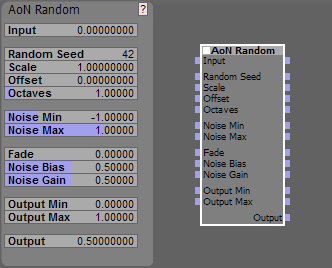
This is the interface:
Image

Initial Beta Documentation:

AoN Random is an add-on to create pseudo-random sequences of control events with a lot of control over the result.
Pseudo random because it will create the same sequence for the same input numbers, which is often preferable over real randomness, since you can repeat a certain sequence.
It is based on some shaders I do for 3D-graphics, but I hope you will find it helpful for audio as well - I tried to adapt the underlying concept to be useful in this area.

Let's look at the controls:

Input:
Here you plug in the values that the noise is based upon - without this, nothing will happen.
Usually you will use some kind of timing information, in my tests I mostly used a MasterSync nodes "tot ppq" output which I multiplied to get a fitting range (Edit: in the latest version you can use the scale parameter for this). I highly recommend using an oscilloscope on the Output to visualize what's going on.

I decided to not build in timing tools inside of the node for now to not waste time on things already covered in Usine and because instead of time, you can also plug in the output of a sequencer, a LFO or any other generator that produces continuous streams of data. Just make sure the values span a large enough range (or multiply it with "Scale") since AoN Random in essence creates a random value per 1 unit of input, so a 0-1 input will not do much, a 0-10 or 0-100 input will be more interesting.

NEW
Random Seed:
This was first introduced in AoN_Random_Array, but I liked the feature and decided to integrate it in AoN_Random as well.

For each integer value of Random Seed, a completely different internal table of random values is created (9973 of them in fact).
So even for pretty long loops, you shouldn't need to change this in a performance. Still it can be convenient to change the value to instantly get a different sequence of values for instance, if you don't use time, but a sequencer as input and you want to try out different patterns for a fixed range of input values (for an alternative, see the Offset parameter below).

Since the internal sequence is generated based on this value only, you should get exactly the same results (for repeatability) when using the same settings.

The creation of the random number sequence can take a bit of CPU, so you shouldn't drive this at audio or even control rate. And you may never have to change it at all if you are happy with the other controls possibilities.
If performance is a concern, try changing the area you see with Offset instead.

- Random Seed changes the underlying noise values completely, so no smooth interpolation is possible. If you need that, I'd recommend fading between two AoN Random nodes with different Random Seeds and only change Random Seed when the influence of one of them is at zero (so the jump can't be heard).

NEW
Scale:
This parameter was also first part of AoN Random Array, but I think it makes working with AoN Random easier as well, so here it is.
A value of 1.0 (the default) will use your input values directly, smaller values will give you a zoomed in view on the noise where details are more stretched out, while larger values at one point will give you something that looks more like typical randomness, since you can no longer see the interpolation.
You could also say, that smaller values "slow down" the noise and larger Scale values speed it up (if you feed in time that is).

Offset:
This is basically a convenience input: It's value is added to the Input value on every level of the noise.
I realized in the meantime that it isn't really necessary, since Usine adds values automagically if you have several connections to the same input, but it's still convenient if you only want to have a static Offset to see a different noise area.
The idea is, that for instance you have a Master Sync node feeding into the main Input, and then something else to distort the very even flow plugged into Offset, like a LFO or another AoN Random node. This allows you to easily break up the initially relatively regular distance between the random values, giving you a more random feel.
See the included AoN Random Example.wkp for a - well - example :-)
Offset has no impact on performance.

Another, more basic use is, to use Offset as a way to have several noises fed by the same input but still have every one generate a different sequence, simply be offsetting each node by some (not too small: 0 - 9973 is the range that makes sense) number.

Octaves:
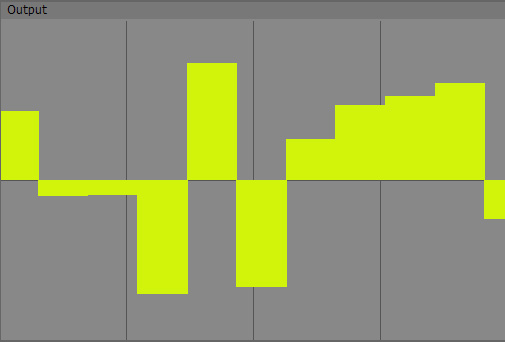
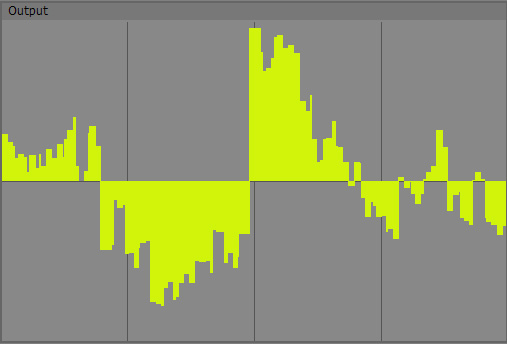
If set to 1, only a basic sequence of random numbers wil be created, basically one for each 1 unit of input. If set to 2, a second layer of randomness will be added, at half the intensity and half the size (this is the reason to call it "Octave"). This results it pseudo-fractal detail.

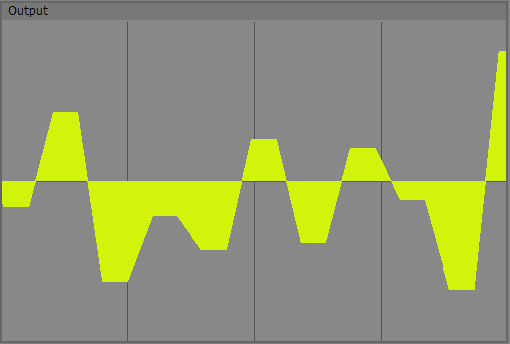
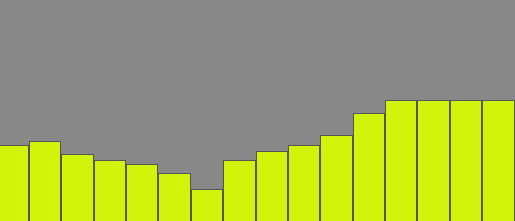
A very basic output of AoN Random with 1 Octave (Fade set to 0):
Image

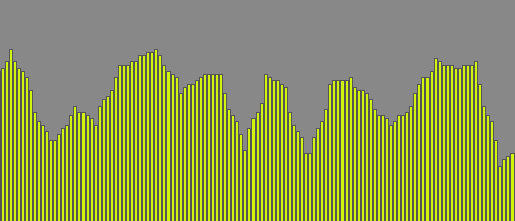
And with 3 Octaves:
Image

This is not exactly the same area from the noise, so the features are not identical, but you can clearly see how the two additional octaves add "local" detail to the larger blocks of the first octave.
I've limited Octaves to 16, since IMO it makes not too much sense to go higher - if you should find this being a limitation for your use, please let me know.
The reason why I limited it is, that for each octave, the algorithm is recalculated, so for 16 octaves you have basically 16 times the CPU load. So only use as many octaves as you really need, otherwise you waste resources.

In most implementations, octaves are integers. But I always found this limiting and the sudden changes unwelcome in graphics as it would be in audio. Therefore, in AoN Random you have a floating point value to dial in octaves and they fade in and out smoothly. This also makes it possible to control the amount of detail in the noise with other controllers.

Noise Min & Noise Max:
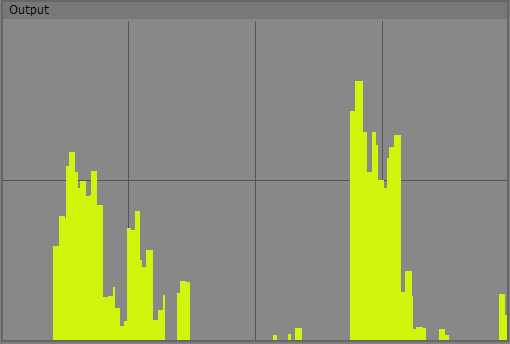
Internally with one octave, the noise is always normalized into a range between -1 and 1. Now when you use more octaves, it is possible that some parts go out of this range and are therefore cut-off. With Noise Min and Noise Max you can open this range up a bit to get the full spectrum of the noise created.
But sure you can also use it as a creative tool: For instance, if you set Noise Min to 0.0, the lower part of the noise will be cut off completely leaving only some islands where you get parameter changes. If you would set Noise Min to 0.5, it would be even more extreme and only very sparsely you would get output. This is great if you want an every-now-and-then stutter rather than a continuous noise.

Here is an example of a noise similar to the 3 octave setting above, but Noise Min set to 0.0 to cut off everything below (the oscilloscope was adjusted as well to reflect the change):
Image

So while this isn't the most important parameter, sometimes it will come in handy.
It has no influence on performance

Fade:
Now to the fun part :-)
Fade is a control that allows you to interpolate between the random numbers.
At a value of 0.0, no interpolation takes place, you get a "Sample and Hold", hard stepped result like in the examples above.
For values higher than zero, you get a slope between the steps.
If you set Fade to 0.5, you get 50% slope and 50% plateau, Fade at 1.0 will give you slopes only, which will produce linear ramps with no plateaus at all.

This first example shows AoN Random with 1 octave and a Fade-value of 0.5:
Image

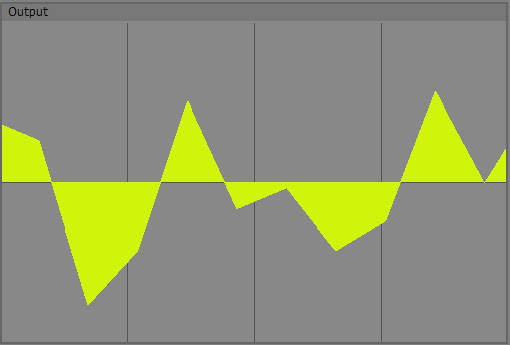
Then I turn Fade up to 1.0 - which results in "nothing but interpolation":
Image

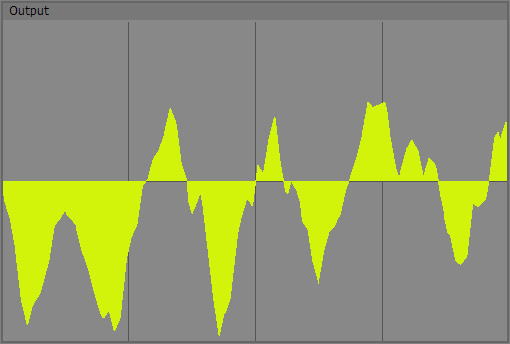
Finally, I turn Octaves to 3, now I get interpolated, detailed noise:
Image

Fade should have a very very tiny impact on performance.

Noise Bias & Noise Gain:
Now this is all fine and dandy, but sometimes you may not want linear interpolation.
This is what Bias and Gain are for.
Maybe it's important to say, that this isn't exactly what the words Bias and Gain are used for in Audio usually, but in graphics this is a rather common use and I took the words from there.
So what is it?
Bias will move the values of the slope in a curved fashion more to the upper or to the lower end (so it only has a function if Slope is > 0).
Important to remember is, that the neutral value here (as for Gain) is 0.5!
At a value of 0.5, nothing will happen, like in all the above examples.
Below 0.5, the slope will be bent towards lower values, above 0.5 it will bend towards higher values - in essence forming shark-fin like curves.

A one-octave noise with Noise Bias at 0.15:
Image

And the other way around, Noise Bias at 0.85:
Image

Noise Gain is like two Noise Bias split in the middle and one inverted, creating mirror-like roundings at the bottom and top at the same time.
Again, the neutral value is 0.5. Below that, the slope will be rounded off at the bottom and the top outwards, giving you a rather smoothly interpolated result, especially at rather low values like in the following example:

Noise Bias back at 0.5 and Noise Gain at 0.05:
Image

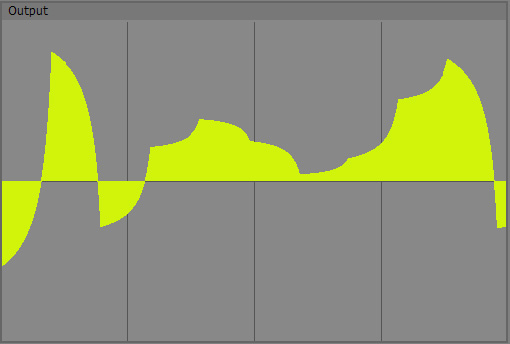
Now with values above 0.5, Noise Gain creates the opposite, a kind of inward-bent s-curve where you get an almost-plateau between the main noise values.

Here I used again Noise Bias at 0.5 and Noise Gain at 0.95:
Image

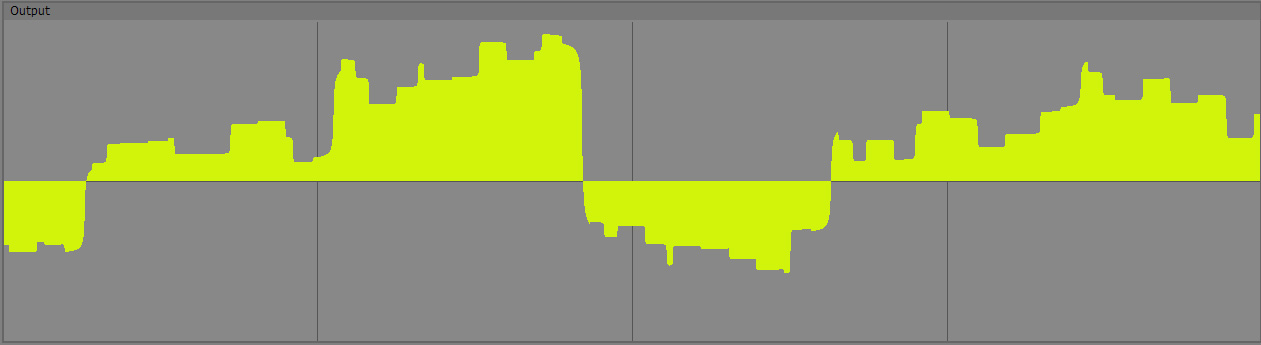
All these values, Fade, Bias, Gain etc. can be mixed to create a broad variety of results, here I have 3 octaves, Fade at 0.5 and Bias and Gain at 0.05. I made the oscilloscope draw faster and the window wider so you can hopefully see the finer detail:
Image

Bias and Gain are very light to calculate, so not much of an impact.

Output Min & Output Max:
We're mostly done now, but these two controls allow you to adapt the output to your needs conveniently.
They spread the internal values to a range of your choosing. So if you need control values between 0 and 1, you would set Output Min to 0.0 and Output Max to 1.0. For a range of -48 to 66, Output Min would be -48 and Output Max 66.
I guess you get the drift ;-)
Basically this spares you some extra nodes.

A nice use of these Min and Max values is, to connect their outputs with the min and max inputs of an oscillator or step module to automagically set the range to the same values as the AoN Random output.
See the latest examples for examples :)

Min and Max has no impact on performance.

Okay, that's basically it.

You can download the updated add-ons below with some also updated basic examples.

Older projects you did may need you to adjust the outputs, since I added parameters.

I would recommend to extract them to your user folder keeping the AoN_Usine folder intact, so you can easily find the add-ons.

Updated 6.2.2011
http://www.screendream.de/AoN_Usine/AoN_Usine.7z

If you don't have 7zip, it's about time to get it ;-)
http://www.7-zip.org/

Cheers,

Thomas

Thomas Helzle
Member
Posts: 334
Location: Berlin
Contact:

Unread post by Thomas Helzle » 28 Jan 2011, 20:10

Obsolete - the examples are now included in the main download above...

headphoner
Member
Posts: 225
Contact:

Unread post by headphoner » 28 Jan 2011, 20:47

Hi,

i just tried it with an lfo module modified by your module and then redirected on the start and end loop of the sampler

Just great !

many others things to do with it!

User avatar
nay-seven
Site Admin
Posts: 5684
Location: rennes France
Contact:

Unread post by nay-seven » 28 Jan 2011, 21:07

yes !
it's an inspiring tool Thomas !
thanks a lot to share

23fx23
Member
Posts: 2545
Contact:

Unread post by 23fx23 » 28 Jan 2011, 21:59

Woa can't wait to test !!!

multiphone
Member
Posts: 303
Contact:

Unread post by multiphone » 29 Jan 2011, 01:57

Hello Thomas,

After quick tests.

First congratulation for the approach of your data generator. This is a real new approach of reaction of the data generated.

A way for build new hight level interface with one samples... certainly.

Your workspace propose a very large "loop" or endless variations.

Very nice !!
HB

Lines / Points / Squares

http://www.hervebirolini.com/

soundmind
Member
Posts: 236
Contact:

Unread post by soundmind » 29 Jan 2011, 02:43

this module is great and can be very useful for many applications in usine. the data creates some very nice "terrains" which can definitely be applied to audio. nice work. I have queued the data stream into an array which provides a very nice way to store sequences and modulation data (and possible waveforms for oscillators?) which brings me to a suggestion which may be useful for this purpose. how about a button which triggers the generation of x amount of array elements worth of data and output the result as an array? anyway very nice work here. thanks for this module.

ethnix73
Member
Posts: 604
Location: France, Caen
Contact:

Unread post by ethnix73 » 29 Jan 2011, 10:00

Thanks to share thomas!

Great tool for randomness.

And you've nearly done all the description for the wiki...Tell me when it should be created, i can do it if you want.
Seb.Dub

Thomas Helzle
Member
Posts: 334
Location: Berlin
Contact:

Unread post by Thomas Helzle » 29 Jan 2011, 14:12

Thanks for the nice replies guys! :D
Great you find it inspiring!

multiphone: The internal "loop" is 9973 entries long before it repeats, should be good for quite long usage and could basically be extended to whatever number is needed if somebody thinks it's not enough. This specific algorithm uses a static sequence of random numbers for speed reasons. (no longer true for the latest update, now the sequence is generated at runtime from your Random Seed value! So you can generate endless variations of different Sequences)
This is also why there is the Offset parameter: if you don't like a certain part of the sequence, just put in some larger offset (0.0 to 9973) to get to another area in the sequence. So it can be used like the random seed parameter in other implementations.
(because of the update, there's a Random Seed value now as well, but changing Random Seed takes CPU where Offset does not).

soundmind: I so far haven't understood the significance of arrays in Usine - the topic came up before. Could you point me to some examples where arrays are used in a way that shows their significance or explain what's special about them?
I am open to extend AoN Random but I would need to understand the "why" and "what" ;-)

ethnix73: Let it cook a bit longer before entering it in the wiki, but thanks for your offer!

Otherwise:
- Has anybody some questions that I didn't answer in the Prelimnary Docs?
- Is there anything important missing or are there things you think are not done in the "Usine" way?
- Would it be useful to have the inputs also as outputs. Some modules seem to replicate almost every input as an output, others don't and I'm too new to Usine to know where it would make sense. What would you suggest?

And maybe another note: this is the first of my modules I found fit for release as a beta since it was useful already. Some of my others need more cooking (for instance the fractal noise node I showed in the beginning of this thread). The audio generator is working, but so far the result wasn't that interesting. Since I never did that before, I need to learn a lot more :-)

Cheers and keep that feedback coming!
I also would love to hear the results if you do something interesting with it.
Further example patches or workspaces of how you use it are also very welcome - both for me and the community!

Thomas

soundmind
Member
Posts: 236
Contact:

Unread post by soundmind » 29 Jan 2011, 15:08

Thomas Helzle wrote:Could you point me to some examples where arrays are used in a way that shows their significance or explain what's special about them?
Well all of usines internal step sequencers are just arrays at their core. The possibilities are endless. for example, having an instant array of data from your module would allow to "store" data streams for later use. and once they are in the form of an array many other manipulations can be done because usine allows you to process entire arrays at once in various ways. currently the only way to store your modules data is to use a queue data in array module to "record" the stream. Finally, arrays can be used for anything from sequencing midi notes to modulating parameters. Hope this helps. thanks.

bsork
Site Admin
Posts: 1334
Location: Asker, Norway
Contact:

Unread post by bsork » 29 Jan 2011, 16:38

This looks great! :)

Thanks!
Bjørn S

Thomas Helzle
Member
Posts: 334
Location: Berlin
Contact:

Unread post by Thomas Helzle » 29 Jan 2011, 20:26

Thanks bsork :-)
soundmind wrote:
Thomas Helzle wrote:Could you point me to some examples where arrays are used in a way that shows their significance or explain what's special about them?
Well all of usines internal step sequencers are just arrays at their core. The possibilities are endless. for example, having an instant array of data from your module would allow to "store" data streams for later use. and once they are in the form of an array many other manipulations can be done because usine allows you to process entire arrays at once in various ways. currently the only way to store your modules data is to use a queue data in array module to "record" the stream. Finally, arrays can be used for anything from sequencing midi notes to modulating parameters. Hope this helps. thanks.
What size of arrays are we talking about? More like the 16 step standard sequencer or more something like 5000 values in a large array?

BTW: If you feed my node with a fixed sequence of input values, you will get out a fixed (= repeatable) sequence of random values, so you may not need to save the sequence somewhere?

Maybe what you are asking for is better done by a different node altogether?
Since it would create one-shot sequences of randomness in the form of an array with selectable size, right? So it wouldn't need a time input, but the sequence could be defined by a Random Seed parameter instead. And while it could use the algorithm I use for AoN Random, maybe there are better solutions for this...

A topic I haven't looked into yet is the creation of midi data. This is definitely something I would like to do, but I have to look into some of the script examples to see how this works in Usine. I only created some midi stuff in Processing so far with the help of some high-level libraries where I didn't have to deal with the details of midi.

Hm - I have to think more about this :)

Cheers! And thanks for the feedback!

Thomas

Thomas Helzle
Member
Posts: 334
Location: Berlin
Contact:

Unread post by Thomas Helzle » 29 Jan 2011, 21:46

I played some more with AoN Random and tried to use it for midi generation.
In this example Workspace I determine the played pitch and the volume with AoN Random, while the note itself is played by a simple sequencer line:

Included in the main download now:
Updated 4.2.2011
http://www.screendream.de/AoN_Usine/AoN_Usine.7z

This is an area where the octaves of AoN Random are helpful, since the sequence isn't randomly jumping around like normal "randomness", but rather you get major pitch changes from the first octave while the higher octaves "play around" that main pitch, so it sounds much more natural.

I used a Wusik Station Piano for this, but if you don't have that, just use any piano or keysound you like instead.

(BTW. Wusik extended their group buy again if you should be interested: http://www.wusik.com/ww/purchase - this is one massive package for little money...)

Cheers,

Thomas

23fx23
Member
Posts: 2545
Contact:

Unread post by 23fx23 » 30 Jan 2011, 01:19

cool back home , gonna test the last one!!. very exicted, looks sooooo cool ;) thanx so much thomas!

soundmind suggested the same i spoke about earlier.
in usine arrays have lot of application. ie all lines,step,points curve modules in /data can be fed by arrays, blocs of datas.
they are manly used as automations loopers.
your module seems the perfect tool to feed them, but instead of having to queue data in array (equivalent of the oscilloscope),
having a static array generation of size X (i would say from 1 to 4096 to limit cpu) that would be instantaneous could be very handy, with lot's of possibilities for usine.
i think about the same thing as soundmind : using your module to generate some cool automations arrays for
those modules, then we can eventually adapt them and store/recall them later using usine tools.(preset manager)
so could be great to generate via a new red array out node of specified size if not too complex, that would really kill.
im not sure but if you generate a big sequence internally of ie 40000 elt, the thing could be to extract ie 256 eltm(chosen size), from index (chosen offset) then it's quite modular for users to scrub a part (kind of seed), keeping your same pins with an extra size setting. to make it simpler, but you probably understood already, get the exact same thing as the oscilloscope screenshots, but as instant array generated by a button press, not each bloc, in addition to the current
(great but different use) single data over time out .

anyway, gonna rest the beast know, looks sooo coool!!

Thomas Helzle
Member
Posts: 334
Location: Berlin
Contact:

Unread post by Thomas Helzle » 30 Jan 2011, 02:27

23fx23: thanks for your feedback.

This sounds indeed interesting and I'm willing to implement it, but I still wonder if it wouldn't be better to have a separate specific node for it?

My idea would be as follows, please correct me if this isn't what you would like:

AoN Random Array
The node is similar to AoN Random, but instead of an input, you would have a "Random Seed" value. For each integer Random Seed Value, you would get the exact same sequence, so that we still get the predictability/repeatability aspect and so that you are able to "store" the RS value when you get something you like.

The Output would consist of an array of optionally integers or floats (or both at the same time - shouldn't be too complex for a one-shot node that doesn't run continually).
Any other format?

And since you can't have external control over the speed, a "Scale" value could be provided that enables you to adapt the span of the sequence - like a "zoom" into the sequence.

What maximum Array size would you suggest? I guess something like 1024 would be sufficient? Or do you see a need for larger arrays?

I have to see how fast this is, if it's fast enough, each parameter change could trigger an automatic refresh - if it's too slow, it could be triggered by a button.

What's the best way to visualize arrays similar to what the oscilloscope does with a sequence?

Cheers,

Thomas

23fx23
Member
Posts: 2545
Contact:

Unread post by 23fx23 » 30 Jan 2011, 02:57

this sounds perfect. good thing for the 'static seed'. yeah for size1024 is probably enough in most cases. if it's easier as separate module (sorry i first thought node=pin)
then yeah that make sense, we are not supposed to use booth function togeteher and they will be optimized accored to their refresh. i thouht it was easier for you to use same module for maintenance, but you are more aware of the best way to do, :), in any cases it will be great and i will be happy:)

you can use simple 'array display or set' in /array to visualise or a step/line/ in /data. all have min/max to set according to the range. if they are feed by input they auto display and take the size of input.
keep's the great works, im tripping from 2h on the module it's awesome, great and clever features! love it!!!

multiphone
Member
Posts: 303
Contact:

Unread post by multiphone » 30 Jan 2011, 12:00

Hello Thomas,

Thank you for your reply. I'm a little busy right now with an ongoing project, so sorry the delay of my reaction.

I wanted to first test the subject alone. I had the same idea about the inputs and outputs "Array ". Generation by a mode button is a good idea, but also a global speed factor are welcome because it's really interesting to reduce the flow of information outputs. The size of "Array out" of 1024 seems correct to me.
HB

Lines / Points / Squares

http://www.hervebirolini.com/

soundmind
Member
Posts: 236
Contact:

Unread post by soundmind » 30 Jan 2011, 12:31

thomas,
thanks for taking interest in the suggestion. It will open up many new possibilities. I also think 1024 is sufficient. As far as making a new separate module, i say whatever is easiest for you. good luck and thanks for this great project.

23fx23
Member
Posts: 2545
Contact:

Unread post by 23fx23 » 30 Jan 2011, 19:35

i played with it all the night, very trippy.

Thomas Helzle
Member
Posts: 334
Location: Berlin
Contact:

Unread post by Thomas Helzle » 31 Jan 2011, 01:16

Hi Guys,

[center][large]It WORKS :)[/large][/center]

Image

That was quite an interesting journey today.

Image

I have to do more tests, since I implemented some new stuff that needs some beating to find out if it's stable, but otherwise my idea worked nicely.

Some questions came up:
- I implemented the "Calculate Array" button with a callback (my first one :) ) is it normal that the calculation is only done when Usines Audio engine is running ("On")? Or do I have to do something different to also calculate the values with the engine Off?

- What is the best callback mode to use? ctAsynchronous, ctNormal or ctImmediate? The calculation creates a short CPU spike that would be good to not interfere with Audio - would Normal or Asynchronous be the better choice? What do you think?

Good news:
- Calculation is very fast, so ATM I have a limit to the arraysize of 2048 values.
- The idea with the Random Seed worked great, I think I will implement that in AoN Random as well instead of the fixed array I used before (old habit from the graphics world ;) ). You can literally create billions of repeatable sequences now :-)

Now I need to find some cool uses for the arrays for testing ;)

Cheers and thanks for your inspiration!

Thomas

23fx23
Member
Posts: 2545
Contact:

Unread post by 23fx23 » 31 Jan 2011, 03:13

woa awesome, and fast!

not expert on sdk, maybe martin or senso could answer you about the callback speed..think it's related to scanning time/latency of changes input, but they are not the same than in scripts..dk

can't wait to play with the final release!

caco
Member
Posts: 306
Contact:

Unread post by caco » 31 Jan 2011, 09:32

IMHO Usine is designed for live use so it is essential that modules can be manipulated in realtime without causing glitches. ctImmediate is the best choice wherever possible as there is then minimal latency between the callback and the resulting parameter change. However, the callback occurs in the audio thread so if your CPU spike is going to be high enough to cause audio glitches then I would play safe and go with ctNormal. I would rather parameter change latency than audio glitch.

Thomas Helzle
Member
Posts: 334
Location: Berlin
Contact:

Unread post by Thomas Helzle » 31 Jan 2011, 12:29

23fx23, caco - thanks for the feedback.

Yeah, I guess we have to do a betatest and you guys tell me if the load is too much and causes problems.
On my 8 core 2008 MacPro with Windows 7 Pro 64 it's okay, but I'm not sure about live performance on a laptop.

ATM I changed the node to react in realtime to changes of parameters (which looks amazing, since you can see the array update while you drag sliders - very intuitive :) ) Maybe I should make that optional, so you can either have realtime updates or update only when you press the Calculate Array Button.
I guess that's the best solution anyway since it allows you to control precisely, when to update and take "snapshots".

The one thing that takes the most CPU is changing the random seed, the calculation of the array itself is pretty fast.

One more question regarding that:
Is it preferable performance wise to fill in a separate internal array and then copy that to the output or is it fine to use SetEvtArrayData in my noise-generating loop to write each value separately? Is there a lot of overhead?

I'll do those changes and test some more before I'll upload the new add-on.

Cheers!

Thomas

Thomas Helzle
Member
Posts: 334
Location: Berlin
Contact:

Unread post by Thomas Helzle » 31 Jan 2011, 20:14

A new beta release is up:
Updated 6.2.2011

>>>>> AoN Usine <<<<< (why does the forum convert the Link name to small letters?)

This contains both "AoN Random" and "AoN Random Array" for your testing pleasure as well as some examples :)

Documentation:

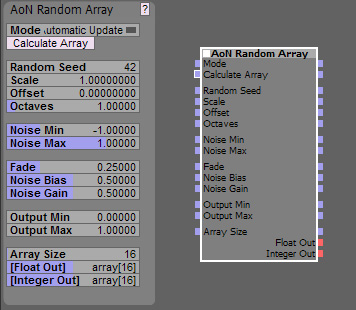
AoN Random Array is very similar to AoN Random, but its output is a static array of values, not a continuous stream of control data.

I will only talk about the new stuff here, please check out the docs for AoN Random above for the other controls.

Image

As you can see, all the inputs are outputs now as well so you can easily use whatever you feed in further down the node tree.
Not sure what the "best practice" is here, but since it should not cost CPU cycles, I'm inclined to make all inputs available as outputs as well.

Mode & Calculate Array:
The Mode dropdown allows you to select if you want automatic, instantaneous updates if you change a value or only want updates to occur if you click on the "Calculate Array" button (or trigger the input, for instance with a clock).
For learning the ways of the node, I recommend the Automatic Mode, since it is very cool to directly see what the values do. If you find the recalculations too CPU hungry, use the Update on Click Mode. The later can also be used to create specific snapshots at certain times. It shouldn't use any CPU at all until clicking the button.
The button has no real function when the Automatic mode is used.

Random Seed:
see AoN Random.

Scale:
Since you can't change the timing you feed into AoN Random Array, I included this control to allow you to scale the output to your needs over the span of the Array. Start with something like 0.1, smaller values will give you a "zoomed in" view on the noise where details are more stretched out while larger values "zoom out" and at one point will give you something that looks more like typical randomness, since you can no longer see the interpolation.

This is a noise with Scale 0.08:
Image

The same noise with Scale 0.35:
Image

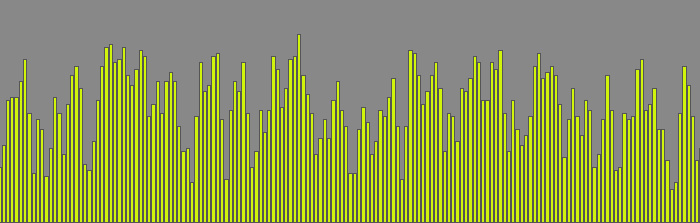
And the same again with Scale 1.0:
Image

So a larger value here means, that you can "see more" of the noise = zoom out.

The following values are the same as with AoN Random, so the next new one is:

Array Size:
Well, I guess this is self explanatory: this is how many values you have in your array :)

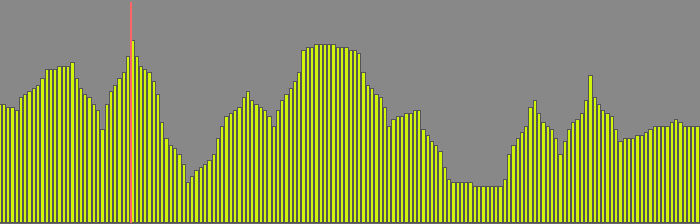
An array with 16 entries:
Image

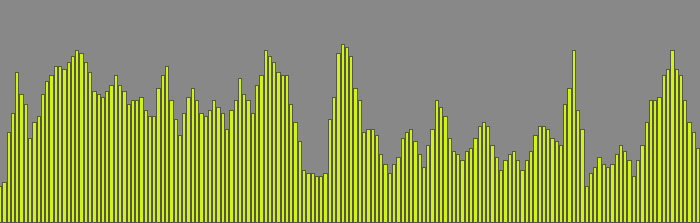
And an array with 128 entries:
Image

Float Out & Integer Out:
For your convenience, I have two outputs where both export the same noise sequence, one as Float Array and one as rounded Integer Array. The first is good for parameter control, the second is best for something like midi.

I think that should be it - please let me know if you have any questions or suggestions!

And again: This is Beta Software, so anything may change, don't rely on it yet for serious use without thorough testing!

Please report any bugs you encounter!

Cheers,

Thomas

multiphone
Member
Posts: 303
Contact:

Unread post by multiphone » 31 Jan 2011, 20:51

Hello Thomas,

Thanks for the "Array out"and all these changes. I'd like to test it but the link you indicate that asks for a password what to do?

Thanks in advance
HB

Lines / Points / Squares

http://www.hervebirolini.com/

23fx23
Member
Posts: 2545
Contact:

Unread post by 23fx23 » 31 Jan 2011, 21:19

hi thomas, still at work, will check when home ;) but i thought your ancient module was also providingins to out when cliqing on little square of module, i think it's a default usine behaviour, maybe no need to compute inside.. lokks great!!!

Thomas Helzle
Member
Posts: 334
Location: Berlin
Contact:

Unread post by Thomas Helzle » 31 Jan 2011, 21:36

ooops - typo - sorry.

Please try again :-)

Thomas

23fx23
Member
Posts: 2545
Contact:

Unread post by 23fx23 » 01 Feb 2011, 00:47

woa just tested. i dreamt for such a tool from a while. it's awesome cool!. :cool: thomas!!
now i can build a tool i was dreaming a while ago using this and caco's filters!. great

..but living in holidays for one month tomorow, so won't patch for a while :(
but ill be under thailand sun. full moon parties and all the mango coktails :D but won't resist check the forum probably .
see ya usinerz'

Thomas Helzle
Member
Posts: 334
Location: Berlin
Contact:

Unread post by Thomas Helzle » 01 Feb 2011, 12:28

23fx23 - Great!
I'm looking forward to what you come up with!

Have fun in Thailand! And be sure to sample some beautiful Athmos! ;)

Cheers,

Thomas

soundmind
Member
Posts: 236
Contact:

Unread post by soundmind » 01 Feb 2011, 14:38

first of all, great work on this thomas. It seems to work perfectly in my tests. I think the auto update feature is great. this will be very useful.

Thomas Helzle
Member
Posts: 334
Location: Berlin
Contact:

Unread post by Thomas Helzle » 04 Feb 2011, 21:48

Hey guys,

today I updated AoN Random.
I now included the Random Seed and Scale parameters that you already know from AoN Random Array.
Since this changed the number of parameters, you may have to reconnect the output to the correct connector in projects you did with the previous beta.
This will also change the results you get (slightly, because of the new way I generate random numbers), so if you have something important, keep the old version somewhere in reach.

I also reworked the examples, they should work correctly with the new versions and especially the AoN_Random_Array example is much more interesting now (I hope).

Find the new things and the files in the original Documentation-Topics above.

Both add-ons have been cleaned out and if nobody reports any bugs over the next weeks, or asks for major updates, we should be ready to call them stable.

Cheers and thanks for any feedback or examples how you use the tools.

Thomas

Thomas Helzle
Member
Posts: 334
Location: Berlin
Contact:

Unread post by Thomas Helzle » 06 Feb 2011, 15:24

And another maintenance update.
I cleaned up the code some more.
The examples have some tiny changes too.

Just redownload if you want.

One question: ATM I use ctAsynchronous for the callback of the RandomSeed ( on MSG_CHANGE ) in AoN Random, since I want it to have as little influence on performance as possible and it's not meant to be used as a continuous controller anyway.
Now when I doubleclick on the value in Usine to change it, there is a warning: "Asynchron loop".
It comes up before I actually enter something and hit return.
Is it simply a bad idea to use ctAsynchronous in this case or do I have to do something specific to prevent this message?

Cheers,

Thomas

Thomas Helzle
Member
Posts: 334
Location: Berlin
Contact:

Unread post by Thomas Helzle » 07 Aug 2011, 01:00

Hi,

one quesion: do I have to recompile my addons for 5.70?
It seems that the input fields behave faulty now with rc1. I can enter values like 10 or 1 or 5, but when I try to enter for instance 0.5 or 0,5, the value goes to something like 0.000001 - very small numbers. I'm unable to enter decimals (for instance for offset or scale in AoN_Random).
I can only work around it if I hook up sliders or knobs to the inputs, then it behaves like expected...

Is that a bug or a feature? ;-)

Thanks and cheers!

Thomas Helzle
Member
Posts: 334
Location: Berlin
Contact:

Unread post by Thomas Helzle » 24 May 2013, 23:06

I'm currently in the process of updating my plugins for Hollyhock.
The first is running already, the others will follow.
As soon as I'm confident that they work reliably, I'll provide a betaversion for you guys and gals to try :-)

Cheers,

Tom

martignasse
Site Admin
Posts: 611
Location: Lyon, FRANCE
Contact:

Unread post by martignasse » 24 May 2013, 23:28

cool :D

let me know about your feeling in the updating process

and i'll test your beta modules, for sure ;)

PS : you can continue the conversion with the 233 sdk, the 234 addition isn't needed for your case, you'll just have to recompile with it at the end
Martin FLEURENT - Usine Developer - SDK maintainer

Thomas Helzle
Member
Posts: 334
Location: Berlin
Contact:

Unread post by Thomas Helzle » 24 May 2013, 23:53

Cool - thanks :-)

I think the whole process was very easy actually, just some hours this afternoon.
The only hindrance was, that I did much more C than C++ in my life, so I basically run much more against boilerplate stuff than anything Usine specific...

I had one situation where threading with multiple AoN-Randoms seemed borked, but I have to re-try this with individually created nodes, since copy and paste of nodes introduces a lot of weirdness in the current release.

I'll report how it goes.

Cheers,

Tom

Thomas Helzle
Member
Posts: 334
Location: Berlin
Contact:

Unread post by Thomas Helzle » 31 May 2013, 22:30

Above mentioned potential multithreading problem wasn't one - the internal LFO of a VST was fighting with my input.

Second plug (the array version) is working as well. This was much faster since I got the hang of it already.

The refresh of the array isn't working as well as it did in 5.x, but I'm sure I'll find out why... :-)

Overall I think the SDK got easier and clearer and the code is smaller and more readable.

Great work Martin!

Cheers,

Tom

Thomas Helzle
Member
Posts: 334
Location: Berlin
Contact:

Unread post by Thomas Helzle » 19 Jul 2013, 20:00

Okay, here's the first test release for Windows x32 and x64 compiled with SDK 1.01.001:

http://www.screendream.de/AoN_Usine/AoN ... llyhock.7z

I'm unsure about the new stuff for Hollyhock, I hope I got it right.
So if anything seems to be missing or not-working or should be improved, please let me know.

Cheers,

Tom

Thomas Helzle
Member
Posts: 334
Location: Berlin
Contact:

Unread post by Thomas Helzle » 28 Jul 2013, 13:46

Hey, if anybody is reading this, I could use a bit of help here:
The above nodes for Usine HH make problems when they are copied and pasted. They somehow seem to get stuck in a weird state where using the controls doesn't really update what they do anymore. Restarting Usine solves it, but that isn't really a solution ;-)

So: is there something specific I have to do so that copy-paste works? Does it need specific code for that?
Or is this a problem in Usine HH? I sometimes have problems with copy-paste with other nodes too, but don't fully understand the pattern yet?

Thanks for any help,

Cheers,

Tom

martignasse
Site Admin
Posts: 611
Location: Lyon, FRANCE
Contact:

Unread post by martignasse » 29 Jul 2013, 17:34

well,

basically, copy/paste is automatically handled for inlets

for the rest (some internal state or variable you want to preserve) it rely on getChunk and setChunk functions.
you can look in the matrix - display or set to see an example of how the cell tab are stored in getchunck and restored in setchunk
They somehow seem to get stuck in a weird state where using the controls doesn't really update what they do anymore
hard to visualize...
are you using some static or global variable for your random algo ? if so, more than one can produce conflicts.

i tried the AoN random, but didn't noticed something wrong when copying/pasting, is there some reproducible way to make it hang ?
Martin FLEURENT - Usine Developer - SDK maintainer

Thomas Helzle
Member
Posts: 334
Location: Berlin
Contact:

Unread post by Thomas Helzle » 29 Jul 2013, 17:54

Hey Martin, thanks a lot for your reply.

I wasn't able to nail it down so far. It seems more likely to happen if I copy/paste multiple nodes at once (like one AoN node and a connected oscillator).

Internally I generate a random array, but that should be regenerated automatically based on the random seed.
It should be threadsafe for all I know (and since it worked when I restarted Usine with the same workspace, I guess it can't be that).

When it happened. it was as if the controls were no longer connected to anything. Output was a constant 1.0 for each number in the array (I was using the array version). Since I encountered hard-to-reproduce strangeness with copy/paste before, I thought I ask if I need to take care of something specific before I go bug hunting.

Since that isn't the case I'll do some more testing on my own - if I should find a reproducible way to make it happen, I'll let you know.

Thanks and Cheers,

Tom

Thomas Helzle
Member
Posts: 334
Location: Berlin
Contact:

Unread post by Thomas Helzle » 16 Aug 2013, 14:26

I just released my new website: http://www.design4audio.de where I mostly show design work for the audio realm.
There is also a page about the AoN_Random plugins with downloads and updated docs:
http://www.design4audio.de/home/aon-random/

Cheers,

Tom

User avatar
senso
Site Admin
Posts: 4424
Location: France
Contact:

Unread post by senso » 16 Aug 2013, 14:43

cool,
perfect job. they are very useful and interesting
Thanks

Thomas Helzle
Member
Posts: 334
Location: Berlin
Contact:

Unread post by Thomas Helzle » 16 Aug 2013, 14:57

Great you like them Senso!
If time permits, I'd really like to code some more for HH...

Cheers and thanks for all your hard work that makes it all possible!

Tom

naarud
Member
Posts: 31
Contact:

Unread post by naarud » 16 Aug 2013, 18:07

Nice, great work on strings photography. inspiring

and thank you for writing a detailed and updated doc for AoN_Random. time to get it back into workspaces!

(your speaker system reminds me a bit the b&w nautilus, with its long horn on the bass speaker)

Thomas Helzle
Member
Posts: 334
Location: Berlin
Contact:

Unread post by Thomas Helzle » 16 Aug 2013, 20:38

Thanks naarud!

Let me know if you encounter any weirdness - I sometimes had issues with copy and paste, but didn't have the time yet to investigate.

I just googled the nautilus - wow, that's slightly over the top, I like it a bit more minimal ;-)
But very interesting that something like that exists!
I guess I would use similar ways of manufacture for my design.

Cheers,

Tom

Post Reply

Who is online

Users browsing this forum: No registered users and 112 guests