
Welcome to %s forums

BrainModular Users Forum

Login Register

Paint Image/Frame

Create your own modules in C++
Post Reply
23fx23
Member
Posts: 2545
Contact:

Paint Image/Frame

Unread post by 23fx23 » 29 Dec 2023, 15:56

currently building a module that uses several painted overlayed "layers"
for ex:
L0: background/grid
L1: wavform path
L2: slices/markers colors semi transparent rectangles
L3 : finally a 'selection' overlay hilight of one of the slice on top of previous layers ect..
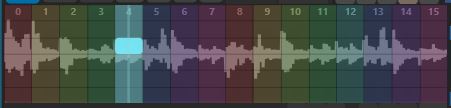
Image

for now every paint call needs to repaint everything from bottom to top, which i feel is not most efficient method.
ideally i would 'buffer' pre-computed static stuff to some image(s) (like bg/grid/wavform/slices colors) could be buffered to one image
so then could paint that pre-calc image, and only the stuff that really changed (here my slice selector) would then be repainted on top of that.
(that is what i usually do in such cases for ex in juce)

I didn't deeply investigated UsineFrame and video stuff yet, so not sure something can be done here, like maybe dirrectly painting to some bmp in,
or an 'internal' image.. but i don't seem to find sdkpaint methods like 'draw Frame /draw image ect.
So Just curious if some users experimented with this, and might have advices / know if something is possible along those lines?


User avatar
oli_lab
Member
Posts: 1261
Location: Brittany, France
Contact:

Unread post by oli_lab » 31 Dec 2023, 19:30

Hi,
Not an expert in that field, but shouldn't be an idea to compute the resulting color instead of adding some layers and then repaint only the rectangle that has changed ?
http://oli-lab.org

Win11 Ryzen9/32GB RAM - RME MADIFACE - SSL alpha link 4-16 - OSC capable interfaces

follow OLI_LAB adventures on Mastodon
@olivar_premier@mastodon.social

23fx23
Member
Posts: 2545
Contact:

Unread post by 23fx23 » 01 Jan 2024, 12:37

yes, thats kinda what i meant, man would only repaint the area that changed,
that means repaint xy pixels sections over a background pre-computed 'image'. but for that man must be able to draw that 'buffer image' in the first place, and store it, and then be able to also only repaint/flag 'dirty' areas.

thats how its done is juce: the 'component' has an image buffer.
man compute/paint all thing that won't change to that buffer (only once), that is your "resulting color'. then juce will use/display that buffer instead of complex repainting that 'build' that image. then if say a cusor rectangle needs to move on top of that, man say someting like: repaint(this_rectangle_only); //(technically also the previous one, as need to be 'erased'..)

but afaii usine paint procedure doesn't allow such thing to 'only re-paint a specific area', the paint call 'flags' complete module area as 'dirty'

technically that kinda is possible already using two modules: one paints the "buffered image" baground layer, feed that to the "Bitmap in" of a second module, that only repaint changing stuff on top of that as an 'overlay' layer. but that is not very handy to use 2x separated modules.
goal here would be do to it all in a single module.. will investigate a bit more..

sm_jamieson
Member
Posts: 551
Contact:

Unread post by sm_jamieson » 10 Jan 2024, 21:24

Just a means to only repaint an area of the image would be welcome, with the rest of the area left unchanged.
I wrote a user module that draws a full 88 note keyboard with highlighted keys. Every key with a load of draw paths, fills, etc. The idea that I would have to redraw all that whenever Usine requested seemed like a disaster.
In practice it doesn't seem to take much processing power even if it might seem inefficient. I Don't know how it compiles up but the executable might be efficient especially if acceleration is on - vector graphics tends to be.
Drawing in Usine is very similar to using html5 canvas api. I believe that requires a full redraw every time.

23fx23
Member
Posts: 2545
Contact:

Unread post by 23fx23 » 11 Jan 2024, 14:17

yeah TBH i was also impressed how it performed
i spend shittons of time optimizing such things in juce i might be biased.. always cache paths/buffers ect
still think some basic still frames manipulation kit could be nice, like load an image, jpg/png to usine frame format,
ideally save some buffer to them, beeing able to simply repaint a stored frame in paint proc even on 'normal' modules would be nice.
maybe just some strecth to fit rect transorm that would be more efficient than looping thru each pixels. atm i don't think man can really paint an image unless im mistaken

User avatar
senso
Site Admin
Posts: 4424
Location: France
Contact:

Unread post by senso » 15 Jan 2024, 10:36

Add a drawPixels procedure is a good suggestion, like a kind of BitBlit ?
It could take an array on ARGB (or RGBA on macOS?) pixels and just blit it into the canvas?

Post Reply

Who is online

Users browsing this forum: No registered users and 53 guests