this one is fun: it's a raw implementation of the "timecoder" code designed for xwax, open-source vinyl emulation software on linux. vinyl emulation software lets djs mix digital audio files through the use of timecode vinyls. there are different types of timecode which match specific proprietary softwares (serato, mixvibes, etc.). but the timecode library in xwax aims at decoding three of them! i don't even know how the developer (mark hills) achieved this but it should have been some kind of work... this lib is also used for the vinyl control part of mixxx, open-source and cross-platform vinyl emulation software.
the module offers 6 I/O : stereo in for the timecode vinyl (or cd), timecode type selector in, rotational speed in (33/45 rpm), pitch out and position out.
position out can suffer from tracking loss in case of dusty vinyl (so always). i didn't implement a filter directly in the module but i gave a possible subpatch in the example to do the job.
serato timecode cd can be used too. an official copy can be downloaded for free at serato website.
i have build an example patch that tries to encompass what we could expect for a virtual turntable. it's here for testing purpose as there is more to do than just mimic existing tools. sounds in the example track come from serato website and freesound.org (by users suonho, HardPCM, pushtobreak and zajo).
i have tested it with serato vinyl and cd.
module: WaxDecoder.zip
sources: waxdecoder_src.zip
patch example: TurntableExample.zip

xwax timecode vinyl decoder implementation
-
nay-seven

- Site Admin
- Posts: 5684
- Location: rennes France
- Contact:
Seems an amazing job !
I'm a newbie in this world, so you add the patch on a track , choose wave sampler as input and add the mp3 provided in this wave sampler , then you use the same sample in the sampler inside the patch or you apply the decode to any other sample..?
then you can replace the mp3 by an hardware cd/controller, i'm right..?
anyway, works and give cool scratch effects , congrats
I'm a newbie in this world, so you add the patch on a track , choose wave sampler as input and add the mp3 provided in this wave sampler , then you use the same sample in the sampler inside the patch or you apply the decode to any other sample..?
then you can replace the mp3 by an hardware cd/controller, i'm right..?
anyway, works and give cool scratch effects , congrats
-
naarud
- Member
- Posts: 31
hi nay,
i launched this a bit fast as i had the system in mind. in fact it's a bit exclusive as it will only be useful for those with turntables (or dj cd players) AND timecode vinyls (or cd...).
here is an picture of a timecode cd waveform (serato one which can be downloaded here. i've uploaded an extract here)

it's a vinyl (or cd) dedicated to control. the pitch of the plate and the position of the needle are computed by analyzing the audio output of the turntable during the playback of this vinyl. this waveform have 3 characteristics :
- the frequency of the pseudo-sine (1kHz here)
- the phase difference between L and R channels (pi/2 here)
- and the amplitude of the signal (here some peaks at -6dB, others at -9dB)
the frequency is used to calculate the pitch of the plate, the phase difference is used to determine the rotation direction and the position is computed by decoding these 0 (-9dB) and 1 (-6dB). that's the job of the decoder. you'll get numerical infos (pitch and position) of your physical device (turntable with timecode vinyl).
so here is a setup of the "traditional" usage (mixing of mp3s with timecode vinyls) from mixxx.org website.
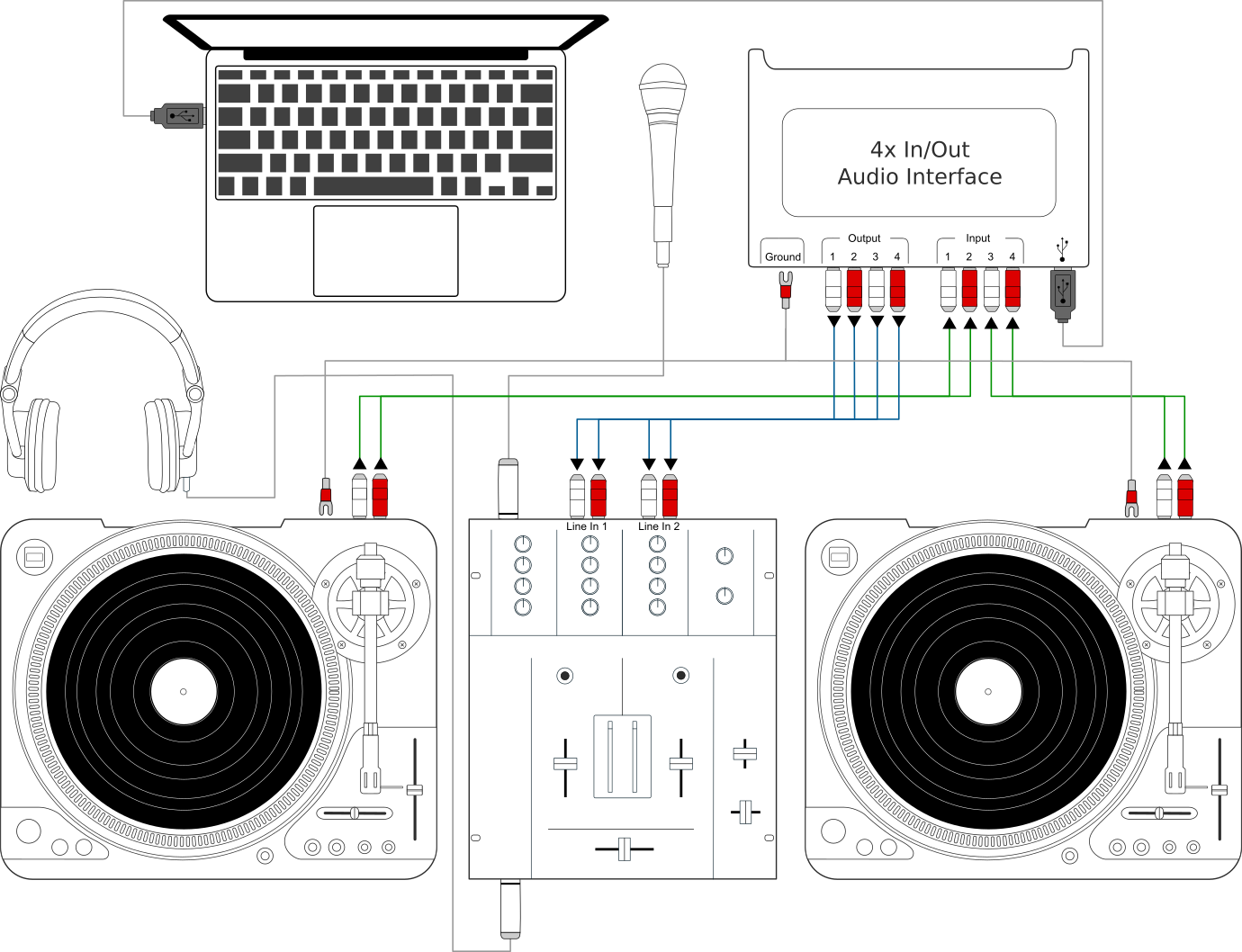
you need two timecode vinyl (or cds), your turntables are plugged into your soundcard (via a phono pre-amp for non-line level turntables), and the soundcard outputs go into your mixer. the soft analyses physical infos of the plate via audio in and sync the playback of the mp3 accordingly to these. audio outputs are finally routed in your mixer and you can mix mp3s with vinyl touch like it was a "normal" dj setup.
in the patch example, audio ins are for an external turntable. the included mp3 have to be loaded in the existing sampler. you can now scratch your timecode vinyl on your turntable and hear the mp3 being scratched.
if you own a turntable (one with a heavy and stable plate, avoid audiophile ones...), you can buy a timecode vinyl for 15€ (serato will work at best with this) and start act like mix master mike or q-bert
i launched this a bit fast as i had the system in mind. in fact it's a bit exclusive as it will only be useful for those with turntables (or dj cd players) AND timecode vinyls (or cd...).
here is an picture of a timecode cd waveform (serato one which can be downloaded here. i've uploaded an extract here)
it's a vinyl (or cd) dedicated to control. the pitch of the plate and the position of the needle are computed by analyzing the audio output of the turntable during the playback of this vinyl. this waveform have 3 characteristics :
- the frequency of the pseudo-sine (1kHz here)
- the phase difference between L and R channels (pi/2 here)
- and the amplitude of the signal (here some peaks at -6dB, others at -9dB)
the frequency is used to calculate the pitch of the plate, the phase difference is used to determine the rotation direction and the position is computed by decoding these 0 (-9dB) and 1 (-6dB). that's the job of the decoder. you'll get numerical infos (pitch and position) of your physical device (turntable with timecode vinyl).
so here is a setup of the "traditional" usage (mixing of mp3s with timecode vinyls) from mixxx.org website.
you need two timecode vinyl (or cds), your turntables are plugged into your soundcard (via a phono pre-amp for non-line level turntables), and the soundcard outputs go into your mixer. the soft analyses physical infos of the plate via audio in and sync the playback of the mp3 accordingly to these. audio outputs are finally routed in your mixer and you can mix mp3s with vinyl touch like it was a "normal" dj setup.
in the patch example, audio ins are for an external turntable. the included mp3 have to be loaded in the existing sampler. you can now scratch your timecode vinyl on your turntable and hear the mp3 being scratched.
if you own a turntable (one with a heavy and stable plate, avoid audiophile ones...), you can buy a timecode vinyl for 15€ (serato will work at best with this) and start act like mix master mike or q-bert
-
nay-seven
- Site Admin
- Posts: 5684
- Location: rennes France
- Contact:
Thanks a lot for those good explanations !
i know it takes time
And i suppose this module can interest 2 kind of people here, dj style of course who know those technique and have the hardware but also ( maybe) experimental ones who can hack this technique and transform a turntable in a creative midi controller . We can use those 3 parameters to send OSC or CC messages for example..
i know it takes time
And i suppose this module can interest 2 kind of people here, dj style of course who know those technique and have the hardware but also ( maybe) experimental ones who can hack this technique and transform a turntable in a creative midi controller . We can use those 3 parameters to send OSC or CC messages for example..
-
naarud
- Member
- Posts: 31
yes, that's the point! that's why i've done a raw implementation of the timecoder code, without any filter in the module, because this is all about modular! it shall be think as a tool that bring a new man-computer interface: scratching is very... real! physic! it involves accurate movements of your hand, arm and body. so it's a module to give the opportunity to think the turntable as an all-purpose controller (even if it has strong limitations: it's just 1D, with 1 rotation around an axis).nay-seven wrote:(...) experimental ones who can hack this technique and transform a turntable in a creative midi controller . We can use those 3 parameters to send OSC or CC messages for example..
the patch example is only here to illustrate how this works and to give some subpatchs that may be useful. even if it isn't forbidden to use it to scratch your loops in live and other more classic stuff that we usually do with turntables
 (scratching a recording of yours is always funny...).
for info, this kind of module already exists for pd and max/msp users since 2008 and was already based on xwax code: vinylcontrol
-
nay-seven
- Site Admin
- Posts: 5684
- Location: rennes France
- Contact:
ok, so thanks again to built this one !
And i hope we'll see projects / video using your module soon !
And i hope we'll see projects / video using your module soon !
-
GDLive

- Member
- Posts: 133
- Location: Landes / Sud Ouest / France
- Contact:
Sure I'll* try this with my augmented bass clarinet with the z rotation movement ! Thanx a lot for the explanation !
* I'm still alive, but I'haven't played with uSine for I while ! (since I saw joffo and the lucid brain integrative project in paris... I think..) I'm just on a new project ... [first baby to take care off ]
* I'm still alive, but I'haven't played with uSine for I while
! (since I saw joffo and the lucid brain integrative project in paris... I think..) I'm just on a new project ... [first baby to take care off ]I'm back...
www.gillesdimanche.com
www.gillesdimanche.com
-
nay-seven
- Site Admin
- Posts: 5684
- Location: rennes France
- Contact:
Congrats GDLive ! (and to the mom of course), have fun and appreciate every moment !
-
GDLive
- Member
- Posts: 133
- Location: Landes / Sud Ouest / France
- Contact:
Thanks, Nay ! And effectively, I haven't found the mute button yet... may something like that http://www.sensomusic.com/forums/viewtopic.php?id=3311 with mother voice.... need some time !
I'm back...
www.gillesdimanche.com
www.gillesdimanche.com
-
naarud
- Member
- Posts: 31
-
GDLive
- Member
- Posts: 133
- Location: Landes / Sud Ouest / France
- Contact:
Don't know, but I tried a few times Steve Reich 6 marimba, (and for the mother also during the long hours in maternity clinics before t0...)
I'm back...
www.gillesdimanche.com
www.gillesdimanche.com
-
krabbencutter
- New member
- Posts: 3
Hi there!
I stumbled upon your Patch and gave it a try and its great! (been playing with xwax since v0.4)
Unfortunately usine is very new to me ^^
So I downloaded the 3 files , put the waxdecoder.usr to modules/user and opened up the patch in Usine.
(Im using windows).
Everything works fine but I'm a bit confused:
- what to do with the WaxDecoder folder?
- if Im scratching a bit too hard the MP3 File will be set to the beginning all of a sudden.
Is there any way to prevent this?
Kepp up the good work!
I stumbled upon your Patch and gave it a try and its great! (been playing with xwax since v0.4)
Unfortunately usine is very new to me ^^
So I downloaded the 3 files , put the waxdecoder.usr to modules/user and opened up the patch in Usine.
(Im using windows).
Everything works fine but I'm a bit confused:
- what to do with the WaxDecoder folder?
- if Im scratching a bit too hard the MP3 File will be set to the beginning all of a sudden.
Is there any way to prevent this?
Kepp up the good work!
-
naarud
- Member
- Posts: 31
hi krabbencutter,
i'm not sure to understand what you call the waxdecoder folder ; there's 3 zip files, one containing the .usr file, an other containing the example patch and the mp3, and the last (waxdecoder_src.zip) containing source files, that you don't need to use the module neither to run the patch.
don't wait for a xwax clone with this patch! i made it to give an basic example of how the module can be used. there are tons of code beneath xwax operations and it isn't easy at all to do the same. you can take a look at the patch and figure out how it works or you can start from scratch to make your own, more suitable to your needs. i think your problem lays at what are usually called absolute/relative/smart modes of vinyl emulation softwares: if you want to scratch hard, you should use something like relative mode. one more time, this is not intended to be a clone of such a soft
i'm currently thinking about a patch that could use this module and would not be a straight vinyl emulation. i'll try to work on this soon, and maybe post it here if all goes like i want...
i'm not sure to understand what you call the waxdecoder folder ; there's 3 zip files, one containing the .usr file, an other containing the example patch and the mp3, and the last (waxdecoder_src.zip) containing source files, that you don't need to use the module neither to run the patch.
don't wait for a xwax clone with this patch! i made it to give an basic example of how the module can be used. there are tons of code beneath xwax operations and it isn't easy at all to do the same. you can take a look at the patch and figure out how it works or you can start from scratch to make your own, more suitable to your needs. i think your problem lays at what are usually called absolute/relative/smart modes of vinyl emulation softwares: if you want to scratch hard, you should use something like relative mode. one more time, this is not intended to be a clone of such a soft
i'm currently thinking about a patch that could use this module and would not be a straight vinyl emulation. i'll try to work on this soon, and maybe post it here if all goes like i want...
-
krabbencutter
- New member
- Posts: 3
Hi naarud,
it was the source files i meant. i was not sure if they were also needed.
Don't worry, I dont expect this to be an Xwax Clone. But your Patch is enabling me something
I have always longed for: manipulating digital Audio files with a turntable and using synths, vsts, whatever
at the same time in the same Software!
For now this patch works fine except for one Thing:
while Im Scratching, the Decoder seems sometimes to lose track. Normally it would simply jump
to another Location inside the track if the Vinyl skips. (the new absolute Location after the needle skipped)
But instead it always resets the loaded mp3-file to the beginning, which is really,really annoying.
Is there any way to fix this?
it was the source files i meant. i was not sure if they were also needed.
Don't worry, I dont expect this to be an Xwax Clone. But your Patch is enabling me something
I have always longed for: manipulating digital Audio files with a turntable and using synths, vsts, whatever
at the same time in the same Software!
For now this patch works fine except for one Thing:
while Im Scratching, the Decoder seems sometimes to lose track. Normally it would simply jump
to another Location inside the track if the Vinyl skips. (the new absolute Location after the needle skipped)
But instead it always resets the loaded mp3-file to the beginning, which is really,really annoying.
Is there any way to fix this?
-
naarud
- Member
- Posts: 31
i uploaded source files only for informative purpose and in respect to xwax open-source philosophy, but you don't need them.
you may have to play with SET and RESET buttons to correct your problem :
the position that xwax library decodes from vinyl doesn't start at 0 but at ~20 (at least on my serato 2 vinyl), and this position of 20 is at the very start of the record, not a safe place to start scratching. so i give an "init position" subpatch option with set and reset buttons, this way you could have a zero position anywhere on the record.
now, if you have the relative zero set to the middle of the record and you are currently using the first half of the record. the sampler will play normally, according to pitch information, but the relative position (which is displayed on the patch control panel) will stay at zero (actually this position is negative). this won't interfere with the sampler module until the "position filter" subpatch detects a jump. then the position will be assigned to sampler : if you are still in the first half of the record (ie relative position < 0), sampler will skip to start.
so when you start using this patch, always press the set button after you've put the needle on the record. it's not convenient, but it was a trick to get this working fast enough to try the user module.
this patch have to be improved, and we could try to find a better solution, maybe inspired by dedicated softwares as xwax, but we'll have to create a subject in the "patching questions" section of the forum.
you may have to play with SET and RESET buttons to correct your problem :
the position that xwax library decodes from vinyl doesn't start at 0 but at ~20 (at least on my serato 2 vinyl), and this position of 20 is at the very start of the record, not a safe place to start scratching. so i give an "init position" subpatch option with set and reset buttons, this way you could have a zero position anywhere on the record.
now, if you have the relative zero set to the middle of the record and you are currently using the first half of the record. the sampler will play normally, according to pitch information, but the relative position (which is displayed on the patch control panel) will stay at zero (actually this position is negative). this won't interfere with the sampler module until the "position filter" subpatch detects a jump. then the position will be assigned to sampler : if you are still in the first half of the record (ie relative position < 0), sampler will skip to start.
so when you start using this patch, always press the set button after you've put the needle on the record. it's not convenient, but it was a trick to get this working fast enough to try the user module.
this patch have to be improved, and we could try to find a better solution, maybe inspired by dedicated softwares as xwax, but we'll have to create a subject in the "patching questions" section of the forum.
-
krabbencutter
- New member
- Posts: 3
Thanks for your Explanation, it was the set-button that did the trick 
As mentioned before I'm very new to usine and this whole workflow.
To Quote one of Ricci Rucker's Battle Records:
"There's only one Thing left to do now: cut it up fresh "
"
As mentioned before I'm very new to usine and this whole workflow.
To Quote one of Ricci Rucker's Battle Records:
"There's only one Thing left to do now: cut it up fresh
"-
naarud
- Member
- Posts: 31
Topic digging here: going back to code, I started by looking at this old module for a fresh update for Hollyhock.
Don't know if anyone used this back in time (I didn't...), but it's good to keep projects alive if possible.
The code and compiled modules for Windows are on Github : https://github.com/beurotta/waxdecoder/ ... s/tag/v2.0
I also updated the example patch for Hollyhock, you can download it here : Turntable example
Don't know if anyone used this back in time (I didn't...), but it's good to keep projects alive if possible.
The code and compiled modules for Windows are on Github : https://github.com/beurotta/waxdecoder/ ... s/tag/v2.0
I also updated the example patch for Hollyhock, you can download it here : Turntable example
-
oli_lab

- Member
- Posts: 1301
- Location: Brittany, France
- Contact:
looks very cool.
can be implementated on a magnetic tape as well to make bows !
can be implementated on a magnetic tape as well to make bows !
http://oli-lab.org
Win11 Ryzen9/32GB RAM - RME MADIFACE - SSL alpha link 4-16 - OSC capable interfaces
follow OLI_LAB adventures on Mastodon
@olivar_premier@mastodon.social
Win11 Ryzen9/32GB RAM - RME MADIFACE - SSL alpha link 4-16 - OSC capable interfaces
follow OLI_LAB adventures on Mastodon
@olivar_premier@mastodon.social
-
naarud
- Member
- Posts: 31
Great idea!
You would need to copy the timecode on the magnetic tape. The serato CD timecode can be downloaded for free on their website : https://serato.com/controlcd.
Let us know if you try this!
Also let me know if you find it usable in its actual form: I kept the module very simple and only implement the raw decoder. But it requires patching (to convert the pitch format, to know if the timecode is currently played, etc.) as you will see in the example patch. Not sure yet if these options should be implemented directly in the module.
You would need to copy the timecode on the magnetic tape. The serato CD timecode can be downloaded for free on their website : https://serato.com/controlcd.
Let us know if you try this!
Also let me know if you find it usable in its actual form: I kept the module very simple and only implement the raw decoder. But it requires patching (to convert the pitch format, to know if the timecode is currently played, etc.) as you will see in the example patch. Not sure yet if these options should be implemented directly in the module.